

Finding the right USB charger is crucial for efficiently managing your devices. Multi-device USB chargers have transformed how we charge gadgets, accommodating everything from smartphones to laptops. The convenience of charging multiple devices simultaneously cannot be overstated, especially in fast-paced environments like home offices or during travel. By investing in a reliable multi-port USB charger, you reduce clutter and ensure your gadgets are always ready to go. But with countless options on the market, selecting the best one can be daunting. This guide demystifies the process, helping you identify chargers that combine performance, speed, and safety for your varied charging needs.
Why You Should Choose a Multi-Device USB Charger
A multi-device USB charger is a game-changer for anyone juggling multiple gadgets. Instead of wrestling with a handful of chargers and cables, a single charging unit allows you to power several devices efficiently. This consolidation not only saves you time but also reduces clutter significantly. Moreover, multi-port chargers are ideal for travel, accommodating the needs of all your devices with ease, eliminating the extra weight of carrying separate chargers for each device. They are also invaluable in a work-from-home setting where operational efficiency is paramount.
Furthermore, multi-device chargers often come equipped with sophisticated technologies like Power Delivery (PD) and Quick Charge, providing your gadgets with the speed and power they need to recharge swiftly. This is increasingly important as manufacturers design devices that demand more power and intelligent charging solutions. Additionally, these chargers boast safety features like overcharge protection and temperature regulation, safeguarding your devices from potential damage. By investing in a reputable multi-port charger, you’re not only ensuring convenience but also extending the lifespan of your devices, making it a practical choice for every tech-savvy individual.
 Key Factors to Consider When Choosing a Multi-Port USB Charger
Total Power Output and Fast Charging Support
When selecting a multi-port USB charger, prioritize total power output and fast charging capabilities. Chargers like those with Power Delivery (PD) technology provide high wattage, ensuring devices with larger batteries, such as laptops, are adequately powered. Look for chargers that offer at least 90 watts or more if you’re charging multiple high-power gadgets simultaneously. Fast charging is another critical feature, significantly reducing downtime by replenishing your device’s battery quickly. This is especially beneficial when time is of the essence, such as during travel or busy workdays. Chargers with cutting-edge charging protocols guarantee speed and efficiency, meeting the demands of modern electronic devices adeptly.
Safety Standards and Temperature Control
Safety is a paramount concern when choosing a charger for multiple devices. Opt for models that adhere to stringent safety standards to prevent overheating, overcharging, and short-circuiting. Temperature control features are particularly crucial, as they ensure the charger operates within safe limits, reducing the risk of damage to your devices. Advanced models, like the Anker Laptop Charger, incorporate safety systems that monitor device temperatures millions of times daily. These sophisticated safety mechanisms offer peace of mind, especially when charging high-power gadgets like laptops and tablets. A reliable charger not only powers your devices efficiently but also shields them from potential hazards, underscoring the importance of choosing one with robust safety features.
Best USB Chargers for Safely Charging Multiple Devices
Anker Laptop Charger (140W, 4-Port, PD 3.1) – Best Overall for Power and Safety
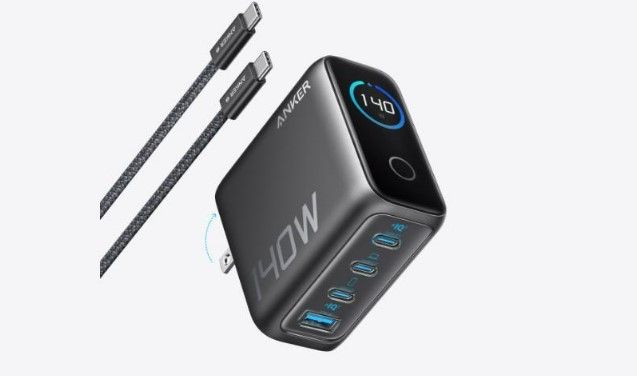
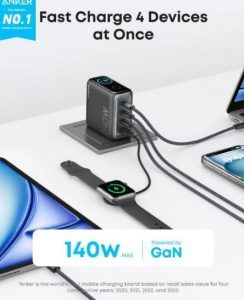
The Anker Laptop Charger stands out as a top-tier choice for charging multiple devices efficiently and safely. With a combined power output of 140W, you can fast charge four devices simultaneously without sacrificing speed or efficiency. This charger features dual high-speed USB-C ports, each capable of delivering a whopping 140W of power, which means you can charge a 15-inch MacBook Air to 50% in just 30 minutes. Such power ensures that all your devices, whether laptops, phones, or tablets, receive sufficient energy quickly.
Safety is paramount with the Anker Laptop Charger, which employs ActiveShield™ 2.0 technology. This system monitors the temperatures of connected devices over 3 million times a day, ensuring your gadgets remain protected from overheating or short-circuiting. Additionally, the charger is equipped with a high-definition color display, providing detailed information on the charging status, temperature, and data for each port. This feature aids in efficient monitoring, giving you full control and peace of mind while powering your devices. Ideal for home, office, or travel use, the Anker Laptop Charger is a reliable powerhouse and the best overall choice in today’s tech-driven environment.
How to Use Multi-Port Chargers Safely
Using multi-port chargers safely is crucial to preserving your devices and ensuring optimal charging efficiency. Start by understanding your charger’s specifications, such as the total wattage and output per port. Distribute your devices across ports thoughtfully, avoiding overloading any single port beyond its capacity. Ensure all connected devices are compatible with the charger’s power output to prevent overheating or inefficiencies in charging. It’s essential to keep your charger in a well-ventilated area during use to avoid any heat buildup that might compromise safety.
Additionally, regularly inspect your charger and cables for any signs of wear or damage, as faulty equipment increases the risk of shorts or malfunctions. Use certified cables that are designed for high-speed charging to optimize performance. Finally, avoid charging devices overnight or unattended when possible. While chargers now come with advanced safety features, taking these precautions helps maximize device safety and longevity. By practicing mindful charging habits, you ensure your devices charge swiftly and safely without unnecessary risks.
Conclusion
Choosing the best usb charger for multi-device use involves balancing power output, safety, and convenience. Chargers like the Anker Laptop Charger exemplify technological advancement in this arena, managing multiple devices efficiently and securely. By focusing on high power output, fast charging capabilities, and robust safety standards, you’re investing not just in convenience but also in the durability and safety of your devices. Whether for travel, home, or office settings, these chargers streamline your gadget powering needs.
Multiple device charging offers technical and practical advantages, sparing you the hassle of dealing with multiple chargers. With features like ActiveShield™ 2.0 and user-friendly displays, these devices are designed to give you peace of mind. Remember, a well-chosen charger will serve you faithfully for years, adapting to your dynamic tech landscape. Make an informed decision today to enjoy a clutter-free, efficient charging experience.
