
Close Menu
CEOColumnCEOColumn
    What's Hot

    Mindfulness vs Medication: Which Helps You Feel Less Broken

    August 5, 2026

    Alzheimer’s Caregiver Resources: Comprehensive Guide for Family Support

    August 5, 2026

    The Importance of Implementing an Equipment Inventory Management System for Businesses

    August 5, 2026
    Facebook X (Twitter) Instagram
    Facebook X (Twitter) Instagram
    CEOColumnCEOColumn
    Subscribe
    • Home
    • News
    • BLOGS
      1. Health
      2. Lifestyle
      3. Travel
      4. Tips & guide
      5. View All

      Mindfulness vs Medication: Which Helps You Feel Less Broken

      August 5, 2026

      Creating Memorable Events Through Thoughtful Food Experiences

      August 2, 2026

      How Legal Representation Can Change the Outcome of a Serious Spine Injury Case

      July 30, 2026

      Best Practices for Coding Nonspecific Gastrointestinal Symptoms

      July 30, 2026

      Why Pop-Up Retail Still Works So Well at Busy Events

      July 27, 2026

      Alexandrite as a Meaningful Gift

      July 21, 2026

      Timeless Elegance: The Essential Guide to Day Dresses

      July 17, 2026

      Art of High-End Glass in Modern Interior 

      July 17, 2026

      What Makes a Private Jet Brokerage Genuinely Worth Working With

      July 31, 2026

      Why California CEOs Keep Choosing Summerlin, Nevada

      July 20, 2026

      How to Plan a Fun-Filled Day in Pigeon Forge

      July 9, 2026

      How International Visitors Are Redefining Urban Living in London

      June 24, 2026

      The Executive’s Guide to Getting Real Value From an Annual Conference

      July 22, 2026

      How Australians Pay for Online Games: Safety and Fees Explained

      July 11, 2026

      Understanding the Value of Professional Legal Guidance

      June 18, 2026

      How Attorneys Balance Negotiation and Litigation Strategies

      June 18, 2026

      What Are the Four Elements of a Negligence Claim in Alabama?

      August 5, 2026

      The Best Lab Grown Diamond Jewelry Retailers to Consider

      August 5, 2026

      Why Paying a Dallas Traffic Ticket Online Could Backfire 

      August 4, 2026

      Top Reasons Private Event Spaces Enhance Special Occasions

      August 4, 2026
    • BUSINESS
      • OFFLINE BUSINESS
      • ONLINE BUSINESS
    • PROFILES
      • ENTREPRENEUR
      • HIGHEST PAID
      • RICHEST
      • WOMEN ENTREPRENEURS
    CEOColumnCEOColumn
    Home»News»Practical Guides for Every Scenario, Powered by DeVoice

    Practical Guides for Every Scenario, Powered by DeVoice

    OliviaBy OliviaFebruary 26, 2026No Comments5 Mins Read

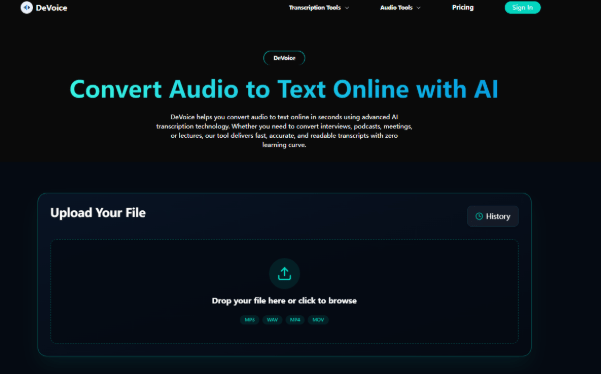
    Whether you’re a busy office worker scrambling to document meetings, a student sorting through lecture recordings, or a content creator adding subtitles to podcasts, audio to text tools have become your ultimate productivity ally in 2026. The key to picking the right tool isn’t chasing fancy tech jargon, but finding one that fits your daily scenarios—easy to use, cost-effective, and reliable. After testing tools across diverse use cases, I can say DeVoice stands out as a versatile solution that nails the basics and excels in real-world use, making audio to text conversion seamless for everyone, regardless of technical expertise.

    Table of Contents

    Toggle
    • Scenario 1: Office Meetings – Turn Chats into Actionable Notes in Real Time
    • Scenario 2: Academic Research – Transcribe Interviews Without the Grind
    • Scenario 3: Content Creation – Add Subtitles Fast for Podcasts & Short Videos
    • How to Choose the Right Audio to Text Tool (Beyond Marketing Hype)
    • Why DeVoice Is the Go-To Tool for 2026’s Audio to Text Needs

    Scenario 1: Office Meetings – Turn Chats into Actionable Notes in Real Time

    Most professionals waste 10+ minutes after every meeting sorting through messy notes or asking colleagues for missing details—butaudio to text changes that. Real-time audio to text transcription lets you focus on the discussion instead of scribbling, and generates editable notes instantly. The best part? You don’t need to set up complex software; top tools work online, so you can launch them in your browser and connect to Zoom or Google Meet with one click.

    I recommend you prioritize tools with speaker diarization—a feature that labels who said what, turning a jumbled transcript into a clear conversation record. Many paid tools lock this behind subscriptions, but free options like DeVoice include it in their core tier. Last month, I used DeVoice for a 90-minute cross-department meeting; it transcribed every comment accurately, tagged each speaker, and even filtered out background keyboard clicks. After the meeting, I just edited a few minor details and shared the notes—saving me nearly an hour of post-meeting work. For remote teams, this kind ofaudio to text tool isn’t just convenient; it’s a time-saver that keeps everyone aligned.

    Scenario 2: Academic Research – Transcribe Interviews Without the Grind

    Researchers and students often face the tedious task of transcribing interviews, focus groups, or lecture recordings. Manual transcription of a 2-hour interview can take an entire day, but audio to text cuts that time to 15 minutes or less. The critical factor here is accuracy—especially for technical terms, academic jargon, or regional accents.

    When testing tools for academic use, I found that custom vocabulary libraries are non-negotiable. This feature lets you input specialized terms (like “cognitive linguistics” or “quantitative analysis”) so the tool recognizes them instantly, reducing errors. DeVoice’s free tier supports custom vocabularies, which is a game-changer for thesis work. I used it to transcribe 12 interviews for my research project; by adding field-specific terms beforehand, the transcript accuracy hit 94%, and I only needed to correct a handful of accent-related misinterpretations. Unlike other free tools that cap transcription time, DeVoice lets you process unlimited 15-minute clips—perfect for breaking down long interviews into manageable chunks. For students on a budget, this free online audio to text option outperforms many paid alternatives.

    Scenario 3: Content Creation – Add Subtitles Fast for Podcasts & Short Videos

    Content creators know that subtitles boost engagement—platforms like YouTube and TikTok show that videos with subtitles get 25% more views. But creating subtitles manually is time-consuming, which is where audio to text tools shine. The ideal tool for creators should support multiple export formats (like SRT, VTT, or TXT) and integrate with common editing software.

    I’ve used DeVoice to add subtitles to my weekly podcast, and its workflow is seamless. I upload the MP3 file, wait 5 minutes for the transcription, edit any minor phrasing issues, and export it as an SRT file directly to my video editor. The tool’s ability to handle conversational speech—including filler words and natural pauses—means the subtitles feel organic, not robotic. What’s more, DeVoice supports 20+ languages and dialects, so I can cater to my multilingual audience without switching tools. For creators who need a free, online audio to text solution that integrates with their workflow, this tool checks all the boxes.

    How to Choose the Right Audio to Text Tool (Beyond Marketing Hype)

    With so many tools on the market, it’s easy to get swayed by flashy ads. But as someone who’s tested dozens, I advise you to focus on three practical factors: usability, cost, and scenario fit. Avoid tools that require complex downloads or hidden fees—online, free tools like DeVoice are more than enough for most users. Test the tool with your specific content (e.g., a meeting recording or interview) to check accuracy, and make sure it supports the file formats you use.

    Don’t overlook small but impactful features, either—like auto-saving transcripts, multi-device sync, or collaborative editing. These features turn a basic audio to text tool into a productivity booster that fits your daily routine.

    Why DeVoice Is the Go-To Tool for 2026’s Audio to Text Needs

    What makes DeVoice stand out is its ability to adapt to every scenario without compromising on quality. It’s free, online, and delivers the accuracy you need—whether you’re transcribing a meeting, an interview, or a podcast. Unlike tools that force you to upgrade for essential features, DeVoice includes speaker diarization, custom vocabulary, and multi-format export in its free tier. Its lightweight browser-based design means you can use it on any device, no setup required.

    In 2026, the best audio to text tools aren’t the ones with the most advanced tech—they’re the ones that make your life easier. DeVoice does exactly that: it takes the hassle out of transcription, lets you focus on what matters, and delivers professional results without costing a dime. Whether you’re a professional, student, or creator, give it a try—you’ll never go back to manual transcription.

    Share. Facebook Twitter Pinterest LinkedIn Tumblr Telegram Email
    Previous ArticleLabral Tears of the Hip: Symptoms, Diagnosis and Management
    Next Article Elevate Your Collection with Exceptional High-End Watches
    Olivia

    Olivia is a contributing writer at CEOColumn.com, where she explores leadership strategies, business innovation, and entrepreneurial insights shaping today’s corporate world. With a background in business journalism and a passion for executive storytelling, Olivia delivers sharp, thought-provoking content that inspires CEOs, founders, and aspiring leaders alike. When she’s not writing, Olivia enjoys analyzing emerging business trends and mentoring young professionals in the startup ecosystem.

    Related Posts

    Alzheimer’s Caregiver Resources: Comprehensive Guide for Family Support

    August 5, 2026

    Ceramic Tile for Shower vs Porcelain Tile for Shower: Which Material Lasts Longer?

    August 1, 2026

    Optima Tax Relief Guides Taxpayers Through FBAR and FATCA Reporting Rules

    August 1, 2026
    Add A Comment
    Leave A Reply Cancel Reply

    You must be logged in to post a comment.

    Latest Posts

    Mindfulness vs Medication: Which Helps You Feel Less Broken

    August 5, 2026

    Alzheimer’s Caregiver Resources: Comprehensive Guide for Family Support

    August 5, 2026

    The Importance of Implementing an Equipment Inventory Management System for Businesses

    August 5, 2026

    What Are the Four Elements of a Negligence Claim in Alabama?

    August 5, 2026

    The Best Lab Grown Diamond Jewelry Retailers to Consider

    August 5, 2026

    Optima Tax Relief Explains When Lawsuit Settlements Are Taxable

    August 4, 2026

    5 Leading Law Firms in Atlanta for Diverse Legal Matters 

    August 4, 2026

    Top 10 Healthcare Machine Learning Development Companies for Regulated Health Products in the USA

    August 4, 2026

    Why Paying a Dallas Traffic Ticket Online Could Backfire 

    August 4, 2026

    Best Law Firms Known for Legal Excellence in Springfield

    August 4, 2026
    Recent Posts
    • Mindfulness vs Medication: Which Helps You Feel Less Broken August 5, 2026
    • Alzheimer’s Caregiver Resources: Comprehensive Guide for Family Support August 5, 2026
    • The Importance of Implementing an Equipment Inventory Management System for Businesses August 5, 2026
    • What Are the Four Elements of a Negligence Claim in Alabama? August 5, 2026
    • The Best Lab Grown Diamond Jewelry Retailers to Consider August 5, 2026

    Your source for the serious news. CEO Column - We Talk Money, Business & Entrepreneurship. Visit our main page for more demos.

    We're social. Connect with us:
    |
    Email: [email protected]

    Facebook X (Twitter) Instagram Pinterest LinkedIn WhatsApp
    Top Insights

    Mindfulness vs Medication: Which Helps You Feel Less Broken

    August 5, 2026

    Alzheimer’s Caregiver Resources: Comprehensive Guide for Family Support

    August 5, 2026

    The Importance of Implementing an Equipment Inventory Management System for Businesses

    August 5, 2026
    © Copyright 2025, All Rights Reserved
    • Home
    • Pricacy Policy
    • Contact Us

    Type above and press Enter to search. Press Esc to cancel.

    Go to mobile version