


Keeping a Windows PC running smoothly in 2026 isn’t just about speed—it’s about combining smart software optimization with routine care. Over time, even modern computers can accumulate junk files, slow down due to unnecessary background apps, or become vulnerable to privacy and security risks. Fortunately, tools like Advanced SystemCare 19 make maintaining your PC effortless, offering a centralized, AI-powered solution to optimize, clean, and protect your system. With the right habits and software, you can keep your device performing like new for years. Here’s a detailed PC maintenance checklist for 2026, highlighting how Advanced SystemCare, a leading PC cleaner and Windows cleaner, can help.
Weekly “Like-New” Software Tune-Up
A weekly maintenance routine is key to keeping your system optimized. Advanced SystemCare 19 simplifies this process through AI-powered automation.
- AI-Powered Deep Scan & Clean: Start ASC 19 in AI Mode to detect hidden system logs, temporary files, and leftover app data. This deep cleaning reduces clutter and can boost performance by up to 200%.
- Deep Registry Cleaning: Over time, invalid registry entries accumulate and cause slowdowns or instability. Use the AI-enhanced Registry Cleaner to safely remove these entries, ensuring your PC runs smoothly.
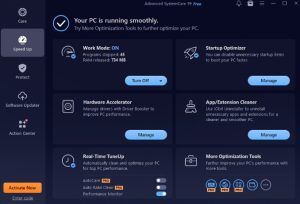
- Startup & Task Management: Many applications launch automatically, slowing boot times. The Startup Optimizer in ASC 19 allows you to disable unnecessary startup apps, improving boot speed and freeing RAM.
- Browser Privacy Sweep: Clear cookies, cache, and browsing history across all browsers to protect your privacy while speeding up web browsing.
- Software Updater: Outdated apps pose security risks. The one-click Software Updater in ASC 19 patches popular programs like Chrome, Edge, and Firefox, keeping your system secure.
Weekly maintenance ensures your system remains uncluttered, responsive, and safer from potential threats. With ASC 19, a single scan can cover multiple optimization tasks in minutes.
Monthly Performance & Security Boost
Once a month, it’s time for a deeper performance and security session. Advanced SystemCare 19 offers specialized tools to maximize your PC’s potential.
- Turbo Boost (Work/Game Mode): Temporarily suspends background services to dedicate maximum RAM and CPU to active tasks. Ideal for heavy workloads or gaming sessions.
- Safe Folder Protection: Secure sensitive files against ransomware and unauthorized access with the Safe Folder feature (available in ASC 19 PRO).
- Real-Time TuneUp: Enable AutoCare and Auto RAM Clean in the Performance Monitor to continuously maintain optimal system performance. These features reduce memory leaks and prevent slowdowns.
- Disk Optimization: Regularly optimize HDDs through defragmentation and SSDs for faster data access. This step improves both boot times and file transfer speeds.
Monthly maintenance combines performance and security, ensuring that your system doesn’t just run fast, but also stays protected from potential digital threats.
Quick Start Guide for Advanced SystemCare 19
Getting started with Advanced SystemCare 19 Free is simple and beginner-friendly. By following these quick steps, you can optimize, clean, and protect your PC in just a few minutes.
Step 1. Launch & Scan
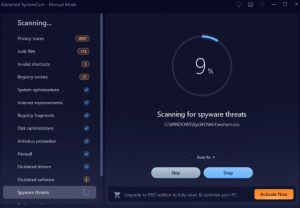
Open this Windows cleaner and click the “SCAN” button in AI Mode under the Care tab. The tool will automatically analyze your system for junk files, privacy risks, invalid registry entries, and performance issues that may be slowing down your PC.
 Step 2. Fix
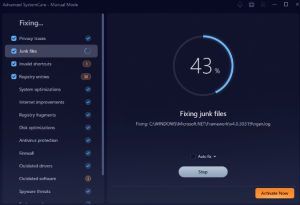
Once the scan is complete, click “Fix” to instantly resolve all detected issues. This includes cleaning temporary files, repairing registry errors, and removing privacy traces that can affect system speed and stability.
 Step 3. Speed Up
 Step 3. Speed Up
Switch to the “Speed Up” tab to improve performance. Enable “Turbo Boost” to temporarily disable unnecessary background processes and run the Startup Optimizer to reduce boot time and free up system resources.
 Step 4. Tools (Advanced Optimization Features)
 Step 4. Tools (Advanced Optimization Features)
Go to the “Toolbox” or “Tools” section to access additional utilities for deeper optimization. Here, you can use features like Disk Cleaner, Internet Booster, and Uninstaller to remove stubborn apps, improve browsing speed, and optimize storage space for better overall performance.
Step 5. Protect
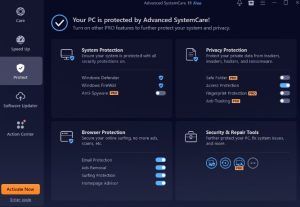
Navigate to the “Protect” tab and enable system protection features such as Fingerprint Protection and Real-Time Monitoring. These tools help safeguard your PC from spyware, malware, and unauthorized tracking.
 Tips for Maintaining a “Like-New” PC in 2026
 Tips for Maintaining a “Like-New” PC in 2026
To maximize the benefits of Advanced SystemCare and keep your PC performing at peak levels, consider these extra tips:
- Regular Updates: Keep Windows, drivers, and software up to date. This prevents compatibility issues and security vulnerabilities.
- Avoid Software Clutter: Remove unused programs to free storage and reduce background processes.
- Manage Startup Apps: Even with ASC 19, periodically review startup programs to avoid unnecessary load on boot.
- Physical Care: Dust, spills, and loose connections can reduce performance or cause damage—don’t overlook hardware.
- Data Hygiene: Maintain routine backups and secure sensitive information with password managers or encrypted folders.
A combination of intelligent software like ASC 19 and consistent physical care ensures your PC remains responsive, secure, and efficient.
Why Advanced SystemCare 19 Is the Ideal Choice
Advanced SystemCare 19 combines multiple tools into a single, intuitive interface. Here’s why it stands out:
- Comprehensive Cleaning: Deep scans remove hidden junk and residual files other cleaners miss.
- AI Optimization: Smart AI modes identify the most impactful performance improvements.
- Privacy Protection: Fingerprint protection and browser sweeps safeguard your data.
- User-Friendly Interface: Even beginners can perform advanced maintenance with a few clicks.
- Free and PRO Options: The free version handles essential maintenance, while PRO unlocks advanced automation and deeper cleaning.
With Advanced SystemCare, maintaining a like-new PC is no longer a chore—it’s a simple, automated process.
Conclusion
Maintaining a PC in 2026 requires more than just occasional cleaning—it requires a structured approach combining software optimization, hardware care, and privacy protection. Using Advanced SystemCare 19 as your central tool, you can perform weekly, monthly, and quarterly maintenance tasks efficiently.
From deep system cleaning and registry optimization to real-time monitoring and privacy protection, ASC 19 ensures your PC remains fast, secure, and reliable. By following this checklist and integrating best practices for physical maintenance and digital safety, you can enjoy a truly like-new computing experience year-round.
Whether you’re a casual user or a power user, Advanced SystemCare is the go-to PC cleaner and Windows cleaner that keeps your system optimized and secure.
