

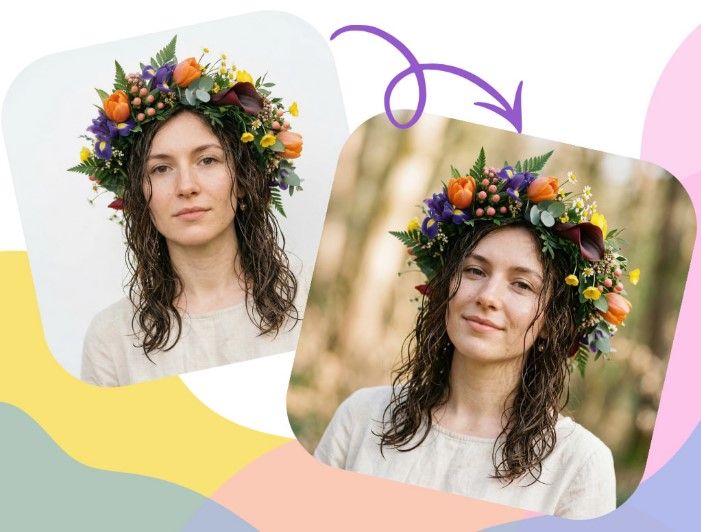
Creative professionals constantly juggle tight deadlines, demanding clients, and the need to produce stunning visuals. Traditional design workflows often involve tedious, repetitive tasks that drain time and stifle creativity. From manually removing backgrounds to spending hours searching for the right stock photo, these bottlenecks can slow down entire projects. What if you could automate the mundane parts of your job and focus more on strategy and imagination?
This is where an ai image editor transforms your process. These powerful tools use artificial intelligence to handle complex edits, generate new concepts, and accelerate your entire workflow from start to finish. By integrating AI, you can produce higher-quality work in a fraction of the time, giving you a significant advantage. This guide will walk you through the exact steps to integrate these tools into your daily routine.
Step 1: Brainstorm and Create a Strong Foundation
Every great visual starts with a solid concept. However, finding the right starting point can be a challenge. Instead of endlessly scrolling through stock photo sites or starting with a blank canvas, you can use AI to generate a unique base image that perfectly matches your vision. This could be a simple text-to-image prompt that describes the scene, mood, and subject you need.
For example, a marketing team needing an image for a new eco-friendly product could prompt the AI with “A minimalist product shot of a bamboo toothbrush on a mossy stone, with soft morning light.” This gives you a custom-made foundation to build upon, saving you the time and cost associated with a professional photoshoot or generic stock imagery. The goal here is not to get a final product, but to create a strong visual starting point for the next step.
Step 2: Iterate and Refine with Image-to-Image AI
Once you have your base image, it’s time to explore creative variations. This is where an image-to-image generator becomes invaluable. This technology allows you to upload your source image and use text prompts to guide the AI in modifying it. You can change the style, composition, colors, or even the objects within the scene without needing complex manual editing skills. A Free Image to Image AI Generator Online is an excellent tool for this stage of the workflow.
Let’s say your initial AI-generated image of the toothbrush is good but not perfect. You can upload it and use prompts to refine it. For instance, you could try “Change the background to a clean, white marble countertop” or “Make the style more cinematic with dramatic shadows.” In seconds, you can generate dozens of high-quality variations, allowing you to A/B test different concepts or present multiple options to a client with minimal effort.
Step 3: Perfect Your Visual with AI Editing Tools
After generating the ideal composition, the next step is to make final adjustments and professional touch-ups. Modern AI editors are equipped with intelligent features that simplify what used to be time-consuming tasks. This includes one-click background removal, smart object selection, and automatic color correction.
Imagine your AI-generated image has a small, distracting artifact in the corner. Instead of painstakingly using a clone stamp tool, an AI object remover can erase it seamlessly in seconds. If you need to place the product on a different background for a website banner, AI background replacement tools can do it instantly while preserving fine details like shadows and hair. This stage is all about using AI to polish your image to a professional standard efficiently.
Step 4: Automate Resizing and Repurposing for Different Platforms
A single campaign often requires assets in various sizes and formats for social media, email newsletters, web banners, and print ads. Manually cropping and resizing each image is tedious and prone to error. An AI image editor can automate this entire process through batch processing.
You can upload your final image and create a template for all the required formats. For example, you can set up presets for an Instagram post (1080×1080), an Instagram Story (1080×1920), and a Facebook ad (1200×628). The AI will intelligently crop and resize the image for each platform, often using content-aware scaling to ensure the main subject remains perfectly framed. This saves hours of work, especially when dealing with large volumes of images.
Step 5: Finalize and Integrate Your Assets Seamlessly
With your images generated, refined, and resized, the final step is to integrate them into your projects. Because the AI-assisted workflow is so efficient, you have more time for quality control and ensuring every visual aligns perfectly with your brand’s guidelines. The assets are ready to be uploaded to your content management system, scheduled on social media, or sent to the printer.
This streamlined process not only accelerates project completion but also enhances creative output. By letting AI handle the technical and repetitive work, you and your team are free to focus on bigger ideas, strategic planning, and creative direction. The result is a more agile and innovative workflow that produces better results faster.
Tips for Getting the Most from Your AI Image Editor
To truly maximize the benefits of these tools, follow a few best practices.
Provide Clear and Descriptive Prompts
The quality of your AI output depends heavily on the quality of your input. When using an image-to-image generator, be as specific as possible with your text prompts. Instead of “make it look better,” try “Apply a warm, golden hour lighting effect and increase the color saturation slightly.” Include details about style, mood, lighting, and composition.
Start with High-Resolution Source Images
Whether you’re using an AI-generated image or a photograph, always start with the highest possible resolution. A clear, detailed base image gives the AI more data to work with, resulting in cleaner and more professional-looking edits, generations, and upscales. A pixelated input will almost always lead to a blurry or distorted output.
Layer Different AI Tools for a Complete Workflow
Don’t expect one tool to do everything. A powerful workflow often involves a combination of different AI solutions. You might use one tool for initial image generation, another for upscaling the resolution, and a third for final edits like object removal or color grading. Combining their strengths will give you the most control and the best final product.
Always Perform a Final Human Review
AI is an incredible assistant, but it’s not a replacement for a discerning human eye. Always review the final output for any small errors, artifacts, or inconsistencies. A quick manual check ensures that the image meets your quality standards and perfectly aligns with your creative vision before it goes live.
Common Pitfalls in AI-Assisted Workflows
While AI tools are powerful, there are a few common mistakes to avoid.
Relying on Generic, Default Settings
Many users make the mistake of only using the default settings and simplest prompts. This often leads to generic or repetitive results. Take the time to explore the advanced settings in your AI tools. Adjust parameters like “style strength” or “creativity level” to fine-tune the output and create something truly unique.
Ignoring Copyright and Ethical Considerations
It’s crucial to understand the terms of service for any AI tool you use, especially for commercial projects. Ensure you have the rights to use the base images you upload, and be aware of how the platform handles the ownership of the AI-generated content. Always prioritize ethical and legal compliance to protect yourself and your clients.
Forgetting the Importance of Brand Consistency
AI can generate an endless variety of styles, but not all of them will fit your brand. It’s easy to get carried away with creative possibilities and lose sight of your brand’s established visual identity. Always ensure the final images align with your brand’s color palette, tone, and overall aesthetic.
Conclusion: Work Smarter, Not Harder
Integrating an AI image editor and image-to-image generator into your creative process is no longer a futuristic concept; it’s a practical step toward a more efficient and innovative workflow. By automating repetitive tasks, accelerating ideation, and simplifying complex edits, these tools empower creative professionals to focus on what truly matters: creating impactful, high-quality work. Embrace this technology to not only speed up your projects but also unlock new levels of creativity.
