
Close Menu
CEOColumnCEOColumn
    What's Hot

    Body Lift Surgery: A Complete Guide for Patients Considering Total Body Contouring

    May 12, 2026

    What Makes Agricultural Casting Products Important for Reliable Farm Operations

    May 12, 2026

    The Impact of Structured Onboarding on Employee Satisfaction and Productivity

    May 12, 2026
    Facebook X (Twitter) Instagram
    Facebook X (Twitter) Instagram
    CEOColumnCEOColumn
    Subscribe
    • Home
    • News
    • BLOGS
      1. Health
      2. Lifestyle
      3. Travel
      4. Tips & guide
      5. View All

      Why Board Certified Vein Treatment Reduces Risks and Recurrence

      May 12, 2026

      How a CBSE School in Mumbai Prepare Students for Future Careers

      May 12, 2026

      Why Parent Communication Matters in Pre-Primary Education in Pune?

      May 12, 2026

      How Functional Wellness Products Are Reshaping Consumer Health Trends

      May 11, 2026

      Smart Ways to Improve Your Home’s Interior Flow and Design

      May 7, 2026

      Top Skills You Learn in a Greenville Cosmetology Program

      May 5, 2026

      Leicester Sees Surge in Student Housing Demand as International Growth Drives 2026 Market Shift

      May 4, 2026

      How Long Does Balayage Last? Expert Maintenance Tips From Chicago Colorists

      May 4, 2026

      What the Most Organized HOAs, Schools, and Churches Have in Common

      May 11, 2026

      7 Budget Travel Hacks Backpackers Are Using to Stretch Their USA Trip Without Losing Connectivity in 2026

      May 6, 2026

      First-Timer’s Guide to Staying in an Indian Hostel: What to Expect, Pack & Watch Out For

      April 25, 2026

      How to Build a Smarter Executive Travel Policy

      April 25, 2026

      Nighttime Skincare Routine: 5 Steps to Unlock Your Skin’s Overnight Regeneration

      May 4, 2026

      How does spousal support become a defining factor in family cases in Woodridge, IL?

      April 24, 2026

      The Biggest Misconceptions About Uber Accident Claims in Arlington, TX

      April 24, 2026

      How Quiet Is the ResMed AirSense 11?

      April 23, 2026

      Body Lift Surgery: A Complete Guide for Patients Considering Total Body Contouring

      May 12, 2026

      What Should A Good Maternity Health Insurance Cover?

      May 12, 2026

      How Cobalt Hybrid Buffalo Turf Performs in Australia’s Harshest Conditions

      May 12, 2026

      The Regulatory Fallout and Corporate Response to Trucking Crashes

      May 12, 2026
    • BUSINESS
      • OFFLINE BUSINESS
      • ONLINE BUSINESS
    • PROFILES
      • ENTREPRENEUR
      • HIGHEST PAID
      • RICHEST
      • WOMEN ENTREPRENEURS
    CEOColumnCEOColumn
    Home»BLOGS»Using iPads as Kiosks at Events: Setup, Apps, and Best Practices

    Using iPads as Kiosks at Events: Setup, Apps, and Best Practices

    OliviaBy OliviaMay 31, 2025Updated:June 20, 2025No Comments4 Mins Read

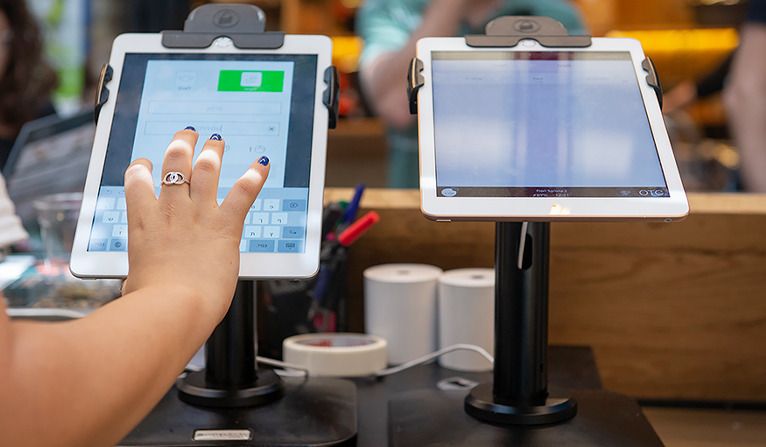
    In today’s digital-first world, event organizers are turning to sleek, modern solutions to enhance guest experiences and streamline interactions. One of the most effective tools for achieving this is the iPad kiosk. Whether it’s for event check-in, product demos, lead generation, or interactive displays, using iPads as kiosks offers a flexible, professional, and cost-effective way to elevate any event.

    Table of Contents

    Toggle
    • Why Use iPads as Kiosks?
      • Key Benefits:
    • Setting Up an iPad Kiosk
      • 1. Enable Guided Access (for simple use cases)
      • 2. Use Single App Mode (for enterprise-level control)
    • Top iPad Kiosk Apps for Events
      • Recommended Apps:
    • Best Practices for a Successful iPad Kiosk Deployment
      • 1. Use Secure Mounts and Stands
      • 2. Power Management
      • 3. Test Thoroughly
      • 4. Brand the Interface
      • 5. Plan for Internet Needs
      • 6. Assign Onsite Support
    • Real-World Use Cases
    • Conclusion

    Why Use iPads as Kiosks?

    iPads are lightweight, visually appealing, and incredibly user-friendly. Their portability and high-resolution touchscreens make them ideal for quick interactions, especially in fast-paced environments like trade shows, exhibitions, corporate conferences, and public expos. With the right setup and apps, they can operate in kiosk mode, turning the device into a single-purpose, secure digital station that meets your event goals.

    Key Benefits:

    • Portability and sleek design
    • Cost-effective compared to custom hardware
    • Easy to manage and deploy
    • Highly customizable for various use cases

    Setting Up an iPad Kiosk

    Setting up an iPad as a kiosk involves configuring the device to run a specific app or set of functions, restricting user access to other parts of the operating system. Here’s how to do it:

    1. Enable Guided Access (for simple use cases)

    Guided Access is a built-in iOS feature that restricts the iPad to a single app and disables certain hardware buttons.

    Steps:

    • Go to Settings > Accessibility > Guided Access
    • Toggle on Guided Access
    • Set a passcode for control
    • Launch your desired app and triple-click the Home or Power button to activate Guided Access

    This is perfect for smaller events or single-use apps like check-in forms or surveys.

    2. Use Single App Mode (for enterprise-level control)

    If you’re managing multiple kiosks across an event or require deeper restrictions, Single App Mode offers a more advanced option. This feature is typically enabled via a Mobile Device Management (MDM) system, which locks the iPad into one specific app, even after restarts.

    Popular MDM platforms include:

    • Jamf
    • Hexnode
    • Mosyle
    • Kandji

    These platforms allow remote configuration, app deployment, and device monitoring — ideal for large-scale event deployment.

    Top iPad Kiosk Apps for Events

    Choosing the right software is just as important as the hardware setup. The best apps offer customization, branding options, offline functionality, and data collection features.

    Recommended Apps:

    1. Eventbrite Organizer / Check-in Apps
      Ideal for managing guest lists and scanning tickets at the door.
    2. Kiosk Pro
      Turns your iPad into a web-based kiosk. Great for interactive catalogs, surveys, or digital signage.
    3. QuickTapSurvey
      Perfect for lead capture and attendee feedback, even offline.
    4. Forms by Zoho or Google Forms (in Safari Kiosk Mode)
      Lightweight solutions for quick data collection.
    5. Hexnode Kiosk Browser
      Offers enhanced browsing restrictions and remote control, perfect for demo stations.

    Best Practices for a Successful iPad Kiosk Deployment

    To ensure your iPad kiosks run smoothly throughout the event, follow these key practices:

    1. Use Secure Mounts and Stands

    Invest in locking enclosures or stands to prevent theft or tampering. Look for models with adjustable angles and built-in cable management.

    2. Power Management

    Ensure continuous power supply. Use power banks or floor chargers to keep iPads running all day. Hide cables neatly to prevent trip hazards.

    3. Test Thoroughly

    Pre-configure and test each device before the event. Simulate user interactions to make sure the flow is intuitive and glitch-free.

    4. Brand the Interface

    Use your event’s logo, colors, and messaging in the app interface to maintain brand consistency and enhance user engagement.

    5. Plan for Internet Needs

    While many apps work offline, some require active connections for syncing. Use secure Wi-Fi or ensure offline capabilities are properly configured.

    6. Assign Onsite Support

    Have a tech-savvy staff member on-site to monitor kiosks and quickly resolve issues if they arise.

    Real-World Use Cases

    • Trade Shows: iPads at booths collect lead information, display product videos, and sign up users for newsletters.
    • Corporate Events: Used for session check-ins, personalized agendas, or attendee networking portals.
    • Weddings and Private Parties: iPads can serve as digital guestbooks, photo booth galleries, or seating charts.
    • Museums and Exhibitions: Offer self-guided tours and interactive learning tools.

    Conclusion

    Using iPads as kiosks at events is a powerful way to digitize interactions, collect data, and streamline operations — all while maintaining a modern, professional appearance. With thoughtful setup, the right software, and best practices in place, your iPad kiosks can significantly enhance the attendee experience and make your event run more efficiently.

    From check-ins to interactive displays, the possibilities are endless — and all at your fingertips.


    Share. Facebook Twitter Pinterest LinkedIn Tumblr Telegram Email
    Previous ArticleBruce Willis Fortune: From Action Hero to $250M Empire
    Next Article Got Dark Spots? How to Treat Acne Marks vs Acne Scars 
    Olivia

    Olivia is a contributing writer at CEOColumn.com, where she explores leadership strategies, business innovation, and entrepreneurial insights shaping today’s corporate world. With a background in business journalism and a passion for executive storytelling, Olivia delivers sharp, thought-provoking content that inspires CEOs, founders, and aspiring leaders alike. When she’s not writing, Olivia enjoys analyzing emerging business trends and mentoring young professionals in the startup ecosystem.

    Related Posts

    Body Lift Surgery: A Complete Guide for Patients Considering Total Body Contouring

    May 12, 2026

    What Should A Good Maternity Health Insurance Cover?

    May 12, 2026

    How Cobalt Hybrid Buffalo Turf Performs in Australia’s Harshest Conditions

    May 12, 2026
    Add A Comment
    Leave A Reply Cancel Reply

    You must be logged in to post a comment.

    Latest Posts

    Body Lift Surgery: A Complete Guide for Patients Considering Total Body Contouring

    May 12, 2026

    What Makes Agricultural Casting Products Important for Reliable Farm Operations

    May 12, 2026

    The Impact of Structured Onboarding on Employee Satisfaction and Productivity

    May 12, 2026

    What Should A Good Maternity Health Insurance Cover?

    May 12, 2026

    How Cobalt Hybrid Buffalo Turf Performs in Australia’s Harshest Conditions

    May 12, 2026

    The Regulatory Fallout and Corporate Response to Trucking Crashes

    May 12, 2026

    Summer Home Troubles: What Could Go Wrong and How to Stay Ready

    May 12, 2026

    How Food Manufacturers Stay Audit-Ready Year-Round

    May 12, 2026

    Best 8 Ways Trade Show Staffing and Models Increase Booth Traffic

    May 12, 2026

    Why Board Certified Vein Treatment Reduces Risks and Recurrence

    May 12, 2026
    Recent Posts
    • Body Lift Surgery: A Complete Guide for Patients Considering Total Body Contouring May 12, 2026
    • What Makes Agricultural Casting Products Important for Reliable Farm Operations May 12, 2026
    • The Impact of Structured Onboarding on Employee Satisfaction and Productivity May 12, 2026
    • What Should A Good Maternity Health Insurance Cover? May 12, 2026
    • How Cobalt Hybrid Buffalo Turf Performs in Australia’s Harshest Conditions May 12, 2026

    Your source for the serious news. CEO Column - We Talk Money, Business & Entrepreneurship. Visit our main page for more demos.

    We're social. Connect with us:
    |
    Email: [email protected]

    Facebook X (Twitter) Instagram Pinterest LinkedIn WhatsApp
    Top Insights

    Body Lift Surgery: A Complete Guide for Patients Considering Total Body Contouring

    May 12, 2026

    What Makes Agricultural Casting Products Important for Reliable Farm Operations

    May 12, 2026

    The Impact of Structured Onboarding on Employee Satisfaction and Productivity

    May 12, 2026
    © Copyright 2025, All Rights Reserved
    • Home
    • Pricacy Policy
    • Contact Us

    Type above and press Enter to search. Press Esc to cancel.

    Go to mobile version