
Close Menu
CEOColumnCEOColumn
    What's Hot

    What State-by-State Lending Rules Mean for Underwriting Data

    November 22, 2026

    What Winter Does to Job Site Schedules

    November 22, 2026

    What Makes an Online Store Trustworthy? 10 Things Every Shopper Should Check

    November 22, 2026
    Facebook X (Twitter) Instagram
    Facebook X (Twitter) Instagram
    CEOColumnCEOColumn
    Subscribe
    • Home
    • News
    • BLOGS
      1. Health
      2. Lifestyle
      3. Travel
      4. Tips & guide
      5. View All

      Winter Hair Care 101: How to Keep Your Hair Soft, Smooth and Full of Life

      November 20, 2026

      What Should Beginners Understand About Feeding Weed and Plant Nutrition Basics?

      November 20, 2026

      The Founder’s Jaw: The Hidden Physical Cost of Running a Company

      November 20, 2026

      The Best Questions to Bring to Your Men’s Hormone Therapy Visit

      November 17, 2026

      Signs Your Florida Home Has a Humidity Problem and How Experts Can Fix It

      October 27, 2026

      Motion Sofa: Flexible Seating for Modern Living Spaces

      October 24, 2026

      How to Plan a Proposal Around Your Partner’s Style

      October 8, 2026

      Best Shampoo for Dandruff: Top Picks for a Healthy Scalp

      October 5, 2026

      How to Efficiently Manage Dual SIMs on One Phone for Frequent Business Travel

      October 22, 2026

      How to Find the Best Villas in Goa for Birthday Celebrations and Parties

      October 16, 2026

      Red Sea Days and Desert Nights in Hurghada

      October 7, 2026

      Luxury Crewed Yacht Charters in Greece: A Complete Guide to Private Yacht Holidays

      October 2, 2026

      Second Acts: What Serial AI Founders Bring to Their Next Company

      November 20, 2026

      How Executives Can Build a Reliable Home Office Network

      November 20, 2026

      Why the AI Age Makes Physical Classrooms More Essential

      November 20, 2026

      The Best Time to Book Mumbai to Delhi Flights: Seasonal Trends and Mid-Week Discounts

      November 20, 2026

      What State-by-State Lending Rules Mean for Underwriting Data

      November 22, 2026

      Opening a Döner vs. Gyros Restaurant: Which Is the Smarter Investment?

      November 20, 2026

      How Farms, Feed Stores and Horse Barns Get Found on Google

      November 20, 2026

      Why Payables Overhauls Stall Without Leadership

      November 19, 2026
    • BUSINESS
      • OFFLINE BUSINESS
      • ONLINE BUSINESS
    • PROFILES
      • ENTREPRENEUR
      • HIGHEST PAID
      • RICHEST
      • WOMEN ENTREPRENEURS
    • Lifestyle
    CEOColumnCEOColumn
    Home»News»Fix Choppy or Lagging Video Files Online

    Fix Choppy or Lagging Video Files Online

    OliviaBy OliviaMarch 20, 2026Updated:March 20, 2026No Comments6 Mins Read

    Having a choppy or lagging video can be distressing, especially if it contains valuable memories. This can disrupt viewing experiences, reduce video quality, and even interfere with professional workflows. If you encounter video lag while playing, it’s important to apply appropriate video repair workarounds immediately. 

    Fortunately, most causes of video lag are identifiable and can be easily fixed using the combination of online tools, system adjustments, and best practices. In this article, we’ll explore different methods to fix choppy or laggy video files online, along with probable causes and preventive measures. Let’s explore in detail! 

    Table of Contents

    Toggle
    • Understanding Why Videos Become Choppy
    • How to Fix Choppy or Lagging Videos Online?
    • Other Alternatives to Fix Choppy or Lagging Video Files
      • Method 01: Convert Video File Formats
      • Method 02: Clear Browser Cache and Cookies
      • Method 03: Reduce Video Resolution
      • Method 04: Update Your Computer Drivers
    • Final Thoughts

    Understanding Why Videos Become Choppy

    Before jumping into video repair solutions, it’s important to understand why videos lag or appear choppy. Some main reasons for the same include:

    • Low Frame Rate: Videos are made up of frames displayed in rapid succession. If a video has a low frame rate (e.g., 15 fps instead of 30 or 60 fps), motion may appear jerky or unnatural.
    • High Compression: If you’ve compressed videos too much to reduce file size, their quality may be degraded. This often results in pixelation and stuttered playback.
    • Corrupt Video Files: Incomplete downloads, transfer interruptions, or storage issues can also cause video lag and playback problems.
    • Codec Issues: A codec is used to encode and decode video files. If your video uses an unsupported or inefficient codec, playback may lag.
    • Device Performance: Limitations Older devices or systems with limited processing power may struggle to play high-resolution videos smoothly.

    How to Fix Choppy or Lagging Videos Online?

    Now that you are familiar with the different causes of your video-related issues, it’s time to apply appropriate fixes. While there are several DIY methods and third-party video repair software available to fix corrupt/damaged/choppy videos, online video repair tools are the best option. Tools like Stellar Repair for Video Online can help you repair damaged video files directly in your web browser, without installing any additional software. This online tool supports repairing videos damaged by issues such as choppy playback, frozen frames, audio-video sync problems, and corrupted headers. 

    The Stellar Repair for Video Online software is known for several features, including: 

    • The software supports repairing damaged video files of several file formats, including MP4, MOV, AVI, MKV, FLV, and more.
    • It uses a “sample file” (a working video from the same device) to reconstruct damaged data accurately.
    • It lets you preview repaired video files before saving them to your device. This ensures the output quality meets your expectations.
    • It can repair HD, Full HD, 4K, 8K, and even higher-resolution videos without compromising quality.
    • As a web-based solution, it runs directly in your browser without requiring downloads or installations.

    Here’s how to fix choppy or lagging video files using this online video repair software:

    Step 1: Visit the official website of Stellar Repair for Video Online. Click the Upload Video button, then select the corrupted video file from your computer.

    Step 2: Once your video is uploaded, click on the “Start Repair” button. The tool will begin analysing the file for damaged frames, missing data, or encoding problems that cause choppiness.
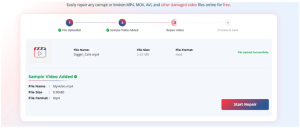
    Step 3: After the repair is complete, preview the repaired video files and click Save Repaired Video to download the repaired file to your device.

    Other Alternatives to Fix Choppy or Lagging Video Files

    Here are some additional video repair methods that you can try to repair your choppy or video lagging issues: 

    Method 01: Convert Video File Formats

    Sometimes converting the video file format can make it compatible with the video player and resolve playback issues. You can use online video converters like Convertio and Zamzar, or tools like VLC Media Player, to change your video’s file format. To change your video format using VLC player:
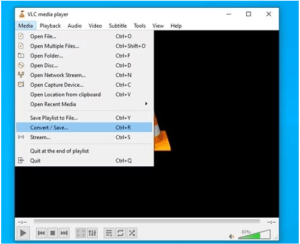
    • Launch VLC Media Player, click Media, then select Convert/Save. 
    • Now, click Add, upload the video file you need to repair, and then press Convert/Save to continue.
    • In the Profile section, select the desired output format, such as MP4, AVI, or MKV, from the dropdown menu.
    • Click Browse to choose where to save the converted video.
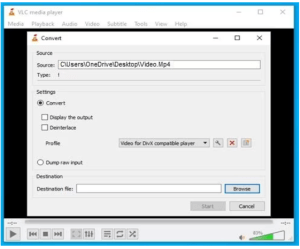
    • Lastly, click Start to begin the conversion process, and wait until it completes successfully.

    Once done, play the converted file and check if it plays smoothly.

    Method 02: Clear Browser Cache and Cookies

    If you are experiencing choppy video or lag while streaming online, clearing your browser’s temporary and cache files might help. You can do this by going to the settings of whichever browser you are using.

    To clear browser cache & cookies on Chrome:

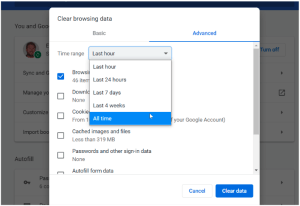
    • Launch the Google Chrome browser on your device.
    • Go to Settings > Advanced > Privacy and security.
    • Click on Clear browsing data.

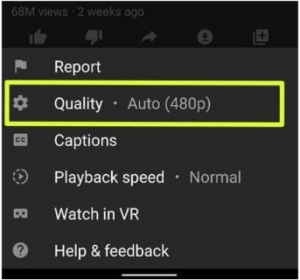
    Method 03: Reduce Video Resolution

    High-resolution videos (like 4K) can lag on slower devices or networks. Lower resolution reduces processing demand, making playback smoother.  You can follow the below steps to reduce your video resolution using an online video editor:

    • Open a browser and upload your video that is lagging or choppy to an online editor.
    • After the video loads, select the lower-resolution option (e.g., 1080p or 720p) based on your needs.
    • Once you’ve selected the desired resolution, click on the “Export,” “Render,” or “Convert” button.
    Method 04: Update Your Computer Drivers

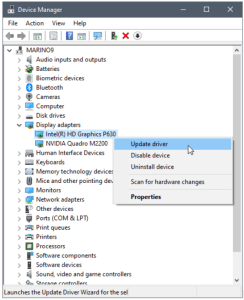
    Outdated computer drivers can lead to performance issues, including choppy video playback. You can update your drivers to ensure your hardware runs smoothly and efficiently, improving video performance. All you have to do is:

    • Right-click the Start icon from the taskbar and select Device Manager.
    • Click on “Display adapters.”
    • Right-click on the specific device you want to update.
    • Choose “Update Driver” from the context menu.
    Final Thoughts

    If your video file is choppy or lagging, try the fixes above one by one to resolve the issue.  With the wide range of online tools available today, most issues—from low frame rates to corrupted files—can be fixed quickly and effectively without installing any software. By understanding the root causes and applying the right solutions—such as adjusting frame rates, converting formats, optimising bitrate, and repairing files with online video repair tools—you can restore smooth playback and enhance video quality.

    Share. Facebook Twitter Pinterest LinkedIn Tumblr Telegram Email
    Previous ArticleEtibar Eyub: Biography, Literary Career, and Cultural Influence
    Next Article Loan DB – Organized Lending Data for Better Financial Insights
    Olivia

    Olivia is a contributing writer at CEOColumn.com, where she explores leadership strategies, business innovation, and entrepreneurial insights shaping today’s corporate world. With a background in business journalism and a passion for executive storytelling, Olivia delivers sharp, thought-provoking content that inspires CEOs, founders, and aspiring leaders alike. When she’s not writing, Olivia enjoys analyzing emerging business trends and mentoring young professionals in the startup ecosystem.

    Related Posts

    What Winter Does to Job Site Schedules

    November 22, 2026

    Why Employee Giving Programs Matter During the Holiday Season

    November 20, 2026

    5 Digital Hobbies To Try During Your Christmas Break

    November 19, 2026
    Add A Comment
    Leave A Reply Cancel Reply

    You must be logged in to post a comment.

    Latest Posts

    What State-by-State Lending Rules Mean for Underwriting Data

    November 22, 2026

    What Winter Does to Job Site Schedules

    November 22, 2026

    What Makes an Online Store Trustworthy? 10 Things Every Shopper Should Check

    November 22, 2026

    Second Acts: What Serial AI Founders Bring to Their Next Company

    November 20, 2026

    How Executives Can Build a Reliable Home Office Network

    November 20, 2026

    Why the AI Age Makes Physical Classrooms More Essential

    November 20, 2026

    Winter Hair Care 101: How to Keep Your Hair Soft, Smooth and Full of Life

    November 20, 2026

    Why Employee Giving Programs Matter During the Holiday Season

    November 20, 2026

    Why Account Funding Is Becoming the Real Test of Open Banking

    November 20, 2026

    Dropshipping After De Minimis: Why Looking Like Every Other Store Now Costs You the Sale

    November 20, 2026
    Recent Posts
    • What State-by-State Lending Rules Mean for Underwriting Data November 22, 2026
    • What Winter Does to Job Site Schedules November 22, 2026
    • What Makes an Online Store Trustworthy? 10 Things Every Shopper Should Check November 22, 2026
    • Second Acts: What Serial AI Founders Bring to Their Next Company November 20, 2026
    • How Executives Can Build a Reliable Home Office Network November 20, 2026

    Your source for the serious news. CEO Column - We Talk Money, Business & Entrepreneurship. Visit our main page for more demos.

    We're social. Connect with us:
    |
    Email: Support@gposting.com

    Facebook X (Twitter) Instagram Pinterest LinkedIn WhatsApp
    Top Insights

    What State-by-State Lending Rules Mean for Underwriting Data

    November 22, 2026

    What Winter Does to Job Site Schedules

    November 22, 2026

    What Makes an Online Store Trustworthy? 10 Things Every Shopper Should Check

    November 22, 2026
    © Copyright 2025, All Rights Reserved
    • Home
    • Pricacy Policy
    • Contact Us

    Type above and press Enter to search. Press Esc to cancel.