
Close Menu
CEOColumnCEOColumn
    What's Hot

    Why Connected Workflows Matter for Ambulatory Surgery Centers

    September 16, 2026

    Global Insights for B2B Decision-Making: Turning Market Signals Into Better Sourcing Strategies

    September 15, 2026

    Important CPAP Machine Features to Understand Before Buying

    September 15, 2026
    Facebook X (Twitter) Instagram
    Facebook X (Twitter) Instagram
    CEOColumnCEOColumn
    Subscribe
    • Home
    • News
    • BLOGS
      1. Health
      2. Lifestyle
      3. Travel
      4. Tips & guide
      5. View All

      Why Connected Workflows Matter for Ambulatory Surgery Centers

      September 16, 2026

      Modern Home Workouts: Choosing the Right Fitness Equipment

      September 15, 2026

      The Connection Between Relaxation and Better Mental Health

      September 14, 2026

      Was There A Moment When Your Knee Went Wrong

      September 10, 2026

      How to Help Your Older Parents Without Feeling Overwhelmed

      September 10, 2026

      Planning a Ceremony with Coastal Views in Sydney

      September 9, 2026

      5 Reasons Professional Care Can Give Families Peace of Mind

      August 20, 2026

      How To Maintain A Fashionable Wardrobe Through Better Clothing Care

      August 10, 2026

      Flying from the US to Guadalajara: what to see and do in Mexico’s cultural capital

      September 2, 2026

      Black Friday travel deals: How to plan a trip around the sale window

      September 2, 2026

      Mitigating the Hidden Costs of Establishing a Manufacturing Facility in India

      August 31, 2026

      Why Successful Entrepreneurs Are Trading Luxury Hotels for the Australian Outback

      August 21, 2026

      Turning Anger Into A Boundary Statement

      September 11, 2026

      4 Strategies for Faster Trial Prep Without Loosing Accuracy

      August 27, 2026

      How Teletherapy Fits Into the Busy Lifestyle of Modern Texas Families

      August 22, 2026

      How to Identify Your Face Shape Online

      August 21, 2026

      Global Insights for B2B Decision-Making: Turning Market Signals Into Better Sourcing Strategies

      September 15, 2026

      Important CPAP Machine Features to Understand Before Buying

      September 15, 2026

      What a Corporate Posting in Germany Can Teach Executives About Spending

      September 15, 2026

      DTF Print Wash-Test Protocol

      September 15, 2026
    • BUSINESS
      • OFFLINE BUSINESS
      • ONLINE BUSINESS
    • PROFILES
      • ENTREPRENEUR
      • HIGHEST PAID
      • RICHEST
      • WOMEN ENTREPRENEURS
    • Audit
    CEOColumnCEOColumn
    Home»BLOGS»How to Create Professional Presentations in Minutes Using WorkPPT AI

    How to Create Professional Presentations in Minutes Using WorkPPT AI

    OliviaBy OliviaNovember 26, 2025Updated:December 17, 2025No Comments4 Mins Read

    Making a traditional PPT takes too much time and energy. You spend hours collecting information, looking for templates and fixing format problems. Now, AI tools are changing how we work. We do not need to worry about design problems anymore.

    WorkPPT is a popular AI presentation generator that makes presentations in minutes. Just need a topic or a simple prompt. This guide will show you the automatic workflow of WorkPPT best AI PPT Makerand discover how itspeeds up your entire presentation process.

    Why WorkPPT AI is Better Than Traditional Tools
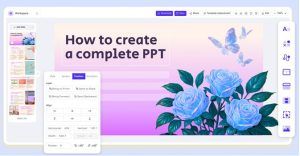
    • 10x Faster: You can get a full first draft in just 1–5 minutes, saving over 90% of the time compared with making slides manually.
    • Smart Content Understanding: It’s more than a template tool. WorkPPT reads your input, understands the key points, and builds clear slide logic with suitable text and images.
    • Professional Design: WorkPPT offers 5,000+ templates across many fields. All designs look modern and professional, so you can create great slides even without design skills.
    • Multilingual Support: Whatever language you type in, WorkPPT generates the presentation in the same language. Perfect for teams working across different countries.

    Step 1: Start Your Account

    It is easy to start using WorkPPT AI:

    Go to the Website: Go to the WorkPPT AI Maker official website.

    Sign Up or Log In: Sign up fast with your Google account.

    Access to AI Slide:After logging in, it will take you to the workspace.

    Step 2: Main Features – 2 Ways to Create Slides

    WorkPPT offers two ways to input your information. You can choose the way that fits your needs best. Before typing your information, you can also set the number of slide cards.
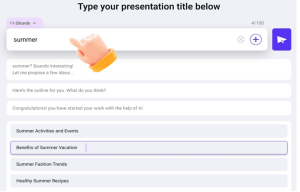

    Method A: Text-to-Slide

    This method is best when you have a clear idea but no document yet. Type a topic or a simple prompt sentence in the text box.

    Example: “The history of World War II.”

    Method B: Document-to-Slide

    If you have a full report, a PDF file, or a Word document, this method saves the most time.Click the plus sign next to the text box to upload the file.

    Supported file types: TXT, Docx, Doc, XLSX, XLS, JPG, PNG, PDF

    Click the “send” icon system willanalyze your information and show you the outline. You can regenerate or edit if the structure does not fityourneeds.

    Step 3: Polish Slides with WorkPPT AI

    The AI automatically fills in the content, designs the layout, and builds the full slide deck for you, and you still have full control to edit, refine, and add your personal style.

    • Change Themes: Switch to a different theme anytime, and your slides will update automatically.
    • One-Click Image Replacement: Replace images instantly without breaking the layout.
    • Add Watermark: Insert your logo or text watermark to protect your presentation.
    • Insert Videos or Audio: Add multimedia files to make your slides more engaging.

    Step 4: Present or Export

    When your slides look ready, you can choose to present them online or export them in different formats.

    WorkPPT supports online presenting, so you can open and present your slides directly in the browser.Your projects come with 30 days of cloud storage, allowing you to access your presentations anytime, anywhere during this period.

    If you want to work offline or use your slides for other purposes, WorkPPT offers four export formats — all without any formatting issues.

    PPTX:Best for further editing in PowerPoint or Keynote. Fully compatible and keeps your design layout perfectly.

    PDF:Great for sending final reports or client deliverables where you want the layout to stay unchanged.

    PNG:Each slide is exported as a high-quality image. Useful for social media posts, blog inserts, or using slides as graphic assets.

    JPG:Smaller file size than PNG. Good for email attachments, quick previews, or fast-loading image sharing.

    More AI Tools to Support Your Workflow

    WorkPPT is more than an AI presentation generator — it also includes a full set of productivity tools to help you handle documents, research, planning, and everyday tasks with ease.

    • AI PDF Tools:
      Merge, split, convert PDF to images, add watermarks, and stamp documents quickly. Ideal for preparing materials before turning them into slides.
    • AI Summarizer:
      Summarize information from text, files, or links. This helps you turn long articles or reports into clear key points for your presentation.
    • AI Mind Map Generator:
      Enter a topic and instantly get a structured, logical mind map. Great for brainstorming, organizing ideas, or planning your slide flow.
    • AI Chat Assistant:
      Ask questions, gather ideas, rewrite text, or get inspiration. It helps you stay productive while preparing content for your deck.

    Conclusion

    Creating slidesmanually is outdated. Using AI PPT makers like WorkPPT AI makerto generate is faster and more professional. It does not replace human designers, but it gives you back your time and lets you focus on your content and presentation.

    Share. Facebook Twitter Pinterest LinkedIn Tumblr Telegram Email
    Previous ArticleWhy Good Web Design Matters More Than Tools
    Next Article Will My Modular House Sell for as Much as a Traditional Build?
    Olivia

    Olivia is a contributing writer at CEOColumn.com, where she explores leadership strategies, business innovation, and entrepreneurial insights shaping today’s corporate world. With a background in business journalism and a passion for executive storytelling, Olivia delivers sharp, thought-provoking content that inspires CEOs, founders, and aspiring leaders alike. When she’s not writing, Olivia enjoys analyzing emerging business trends and mentoring young professionals in the startup ecosystem.

    Related Posts

    Global Insights for B2B Decision-Making: Turning Market Signals Into Better Sourcing Strategies

    September 15, 2026

    Important CPAP Machine Features to Understand Before Buying

    September 15, 2026

    What a Corporate Posting in Germany Can Teach Executives About Spending

    September 15, 2026
    Add A Comment
    Leave A Reply Cancel Reply

    You must be logged in to post a comment.

    Latest Posts

    Why Connected Workflows Matter for Ambulatory Surgery Centers

    September 16, 2026

    Global Insights for B2B Decision-Making: Turning Market Signals Into Better Sourcing Strategies

    September 15, 2026

    Important CPAP Machine Features to Understand Before Buying

    September 15, 2026

    What a Corporate Posting in Germany Can Teach Executives About Spending

    September 15, 2026

    Modern Home Workouts: Choosing the Right Fitness Equipment

    September 15, 2026

    AAFMAA Wealth Management & Trust Takes a Military-Specific Approach to Financial Planning

    September 15, 2026

    Adchitects Builds Corporate Websites With the People Managing Them in Mind

    September 15, 2026

    DTF Print Wash-Test Protocol

    September 15, 2026

    Matthew Deets on Leadership as System-Building, Not Hierarchy

    September 14, 2026

    How to Plan a Bulk DTF Transfer Order Without Overordering

    September 14, 2026
    Recent Posts
    • Why Connected Workflows Matter for Ambulatory Surgery Centers September 16, 2026
    • Global Insights for B2B Decision-Making: Turning Market Signals Into Better Sourcing Strategies September 15, 2026
    • Important CPAP Machine Features to Understand Before Buying September 15, 2026
    • What a Corporate Posting in Germany Can Teach Executives About Spending September 15, 2026
    • Modern Home Workouts: Choosing the Right Fitness Equipment September 15, 2026

    Your source for the serious news. CEO Column - We Talk Money, Business & Entrepreneurship. Visit our main page for more demos.

    We're social. Connect with us:
    |
    Email: Support@gposting.com

    Facebook X (Twitter) Instagram Pinterest LinkedIn WhatsApp
    Top Insights

    Why Connected Workflows Matter for Ambulatory Surgery Centers

    September 16, 2026

    Global Insights for B2B Decision-Making: Turning Market Signals Into Better Sourcing Strategies

    September 15, 2026

    Important CPAP Machine Features to Understand Before Buying

    September 15, 2026
    © Copyright 2025, All Rights Reserved
    • Home
    • Pricacy Policy
    • Contact Us

    Type above and press Enter to search. Press Esc to cancel.