

Distributed Telegram operations break at exactly one point: the moment two operators in different countries share the same session. The platform’s risk engine does not evaluate your account history—it cross-references ASN transition velocity, TCP/IP fingerprint deltas between consecutive logins, WebRTC local IP leakage, and timezone offset mismatches in real time. When those signals conflict, Telegram classifies the session as a credential hijack and terminates it immediately.
The engineers who previously tried to solve this with Playwright or Selenium scripts know the failure mode well: the Python overhead alone consumed weeks of maintenance cycles, and every platform UI update broke the selectors overnight. The correct infrastructure fix starts one layer deeper—each account needs to live inside an isolated hardware identity, which is exactly what a specialized antidetect browser like RoxyBrowser provides at the environment level.
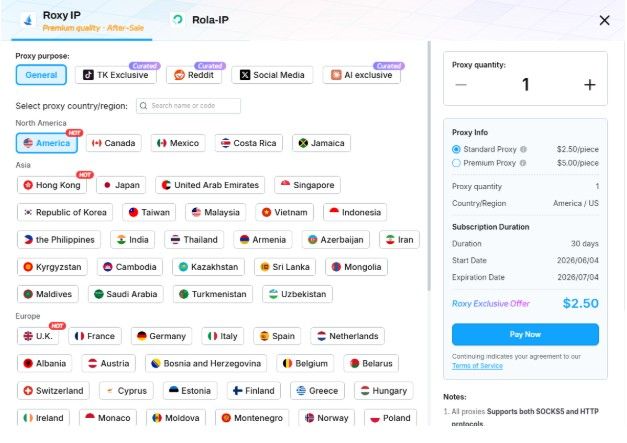
The specific trigger for forced logouts in team handoffs is network identity collision: the IP geography, ASN, and TCP fingerprint all change between operators. RoxyBrowser solves this by letting you bind a dedicated RoxyIP node directly inside each browser profile, so the residential node, device fingerprint, and Telegram session are permanently locked together as a single immutable identity. No matter which team member launches the profile, the platform always sees the same device on the same IP from the same city.
Below is the complete operational workflow.
Phase 1: Build the Zero-Ban Network Foundation in RoxyBrowser
Step 1: Allocate and Bind a Native Residential Node
Open RoxyBrowser. From the left sidebar, navigate to Proxies.
- Set the filter Type to Native Residential (ISP-Level). Never use datacenter blocks for Telegram. Here is why the numbers matter:
| Node Type | Restriction Rate (First 48h) | Avg Session Lifespan |
| Datacenter (AWS / Hetzner) | 78% | < 6 hours |
| Shared Residential | 31% | 1–3 days |
| Native Residential (ISP) | < 0.5% | 30+ days |
- Set GEO to match the account’s original registration country—down to state or city level if available. A German-registered Telegram account should get a German ISP node, not a generic EU pool.
- Set Protocol to SOCKS5. Telegram’s WebRTC voice channel leaks real local IPs over UDP; SOCKS5 routes the full socket connection including the UDP negotiation.
- Filter Connectivity Rate to ≥ 95%. Nodes below this threshold introduce latency variance that generates its own behavioral anomaly signal.
- Click Bind to Profile. RoxyBrowser writes the node credentials directly into the environment’s network layer—no manual host/port/user/pass string to copy-paste.
Pitfall logged from Q2 testing: If you authenticate a Telegram session via Telegram Web on one node, then open Telegram Desktop pointing at a different node—even if both are residential—you still trigger the ASN delta check. Both clients must bind to the identical node. In RoxyBrowser, the Desktop client configuration maps directly to Settings → Advanced → Connection Type → Use Custom Proxy, using the same credentials already baked into the profile.
Step 2: Lock the Hardware Fingerprint with Chromium 149
From the RoxyBrowser dashboard, click New Environment.
- Under Kernel, select Chromium 149. This kernel version has a rewritten canvas rendering pipeline that makes spoofing output mathematically indistinguishable from organic consumer GPU output—earlier kernels have known hash-pattern deviations that Pixelscan flags.
- Click Auto-Randomize (210+ Parameters). RoxyBrowser generates a full hardware profile and locks it permanently to this environment. The parameters that matter most for Telegram specifically:
- Canvas 2D: Noise injection ON (not “block”—blocking is itself a flag)
- WebGL Renderer: Real GPU string, e.g., “NVIDIA GeForce RTX 3060/PCIe/SSE2”
- AudioContext: Oscillator offset applied
- HardwareConcurrency: 8 or 16 (matches standard consumer hardware)
- DeviceMemory: 8 (Navigator API response value)
- Timezone: Auto-locked to the bound node’s GEO
- WebRTC Policy: Force proxy routing, local IP exposure disabled
- Launch the environment. Inside it, navigate to pixelscan.net. The required output before proceeding:
- Real Browser
- Bot Detection: Not Detected
- IP Geolocation: Consistent with profile timezone
Note: If Pixelscan returns “Proxy/VPN Detected” on a residential node, that specific node IP is already in a reputation blocklist. Do not retry—go back to the RoxyBrowser IP Node Repository and select a different node from a different subnet range.
Phase 2: Replace Python Scripts with RoxyBrowser’s AI Agent
Step 3: Deploy the MCP-Integrated AI Copilot
This is where RoxyBrowser’s workflow diverges entirely from traditional automation stacks. With Playwright or Selenium, every UI change Telegram ships—even a minor CSS class rename on the Join button—breaks the entire script silently.
RoxyBrowser’s built-in AI Agent connects via MCP (Model Context Protocol), which maps natural language directives to browser API calls. The agent parses the rendered DOM visually and infers interactive targets from semantic context, not CSS class names. A UI update on Telegram’s side becomes irrelevant.
- From the RoxyBrowser dashboard, select all target profiles (e.g., environments 001–100) and click Launch All.
- Open the AI Agent Console from the top toolbar.
- Type the directive in plain English:
Open all active environments. In each environment, navigate to Telegram Web.
Use the global search bar to query “Web3 Growth Operators”.
Open the top 3 channel results (not groups).
Wait between 40 and 75 seconds before any interaction — randomize per instance.
Like the 3 most recent messages in each channel.
Join the channel.
If a CAPTCHA appears on any instance, pause that instance and flag it in the monitoring panel without closing the window.
- Click Execute. RoxyBrowser spawns a sandboxed parallel execution thread for each profile. Each thread runs inside its own Chromium 149 instance with isolated memory allocation—there is no shared state between accounts.
Step 4: Read the Execution Telemetry
While the agent runs, the RoxyBrowser monitoring panel shows per-instance state:
| Profile | Location | Current Action | Status |
| #001 | DE Residential | Step 5/6: Joining channel | ✅ Clean |
| #002 | DE Residential | Step 4/6: Waiting (61s) | ✅ Clean |
| #047 | US Residential | Complete | ✅ Clean |
| #083 | SG Residential | CAPTCHA flagged | ⚠️ Paused |
| #100 | FR Residential | Complete | ✅ Clean |
Summary: Completed: 97/100 | Flagged: 3 | Total elapsed: 1m 51s
The 3 flagged instances indicate those nodes have accumulated trust-score debt with Telegram’s IP reputation layer. In RoxyBrowser, go to each flagged profile → Edit Environment → Roxy IP → Re-Allocate Node → select a fresh node from a different city in the same country. Re-run only those 3 profiles.
Hardware note: 100 concurrent Chromium 149 instances in RoxyBrowser consume approximately 18–24 GB RAM on the host machine. Because the AI Agent uses dynamic wait injection instead of synchronized time.sleep() calls, CPU load is distributed unevenly across time—peak spikes are roughly 40% lower than equivalent synchronous Selenium scripts.
Phase 3: Scale to a Remote Team Without Distributing Credentials
Step 5: RBAC Configuration in RoxyBrowser Enterprise
Once the single-machine workflow is validated, scaling to a 50-person distributed operation introduces a hard security constraint: team members must be able to operate accounts without ever touching the underlying credentials.
In RoxyBrowser’s Enterprise Matrix panel:
- Navigate to Team Management → Create Sub-Account. There is no limit on sub-account count.
- For each sub-account, click Assign Environments and select only the profiles that operator should access.
- Set the permission mask at the sub-account level:
- Launch assigned profiles: Enabled
- View proxy IP credentials: Disabled
- Export session cookies: Disabled
- Export profile configuration: Disabled
- Modify fingerprint parameters: Disabled
- The operator logs into their restricted RoxyBrowser dashboard. They see exactly the profiles assigned to them—nothing else. They click Launch. The Telegram session opens, already authenticated, already on the correct residential node, already presenting the correct hardware fingerprint.
- When you update a profile’s node or rotate a session cookie from the admin account, the change propagates to all assigned operators within 1 second via RoxyBrowser’s real-time sync layer.
Offboarding is zero-friction: Revoke the sub-account. All profile assignments detach. The environments, session data, and IP bindings remain intact under your admin account. No credential rotation is required at the account level.
Pre-Flight Checklist
- [ ] Native residential node bound in RoxyBrowser — connectivity rate ≥ 95%
- [ ] Telegram Desktop proxy configured to match profile node (if using Desktop client)
- [ ] Pixelscan returning clean on all profiles before batch execution
- [ ] AI Agent directive tested on 1 profile before scaling to 100
- [ ] CAPTCHA-flagged profiles identified post-run, nodes re-allocated
- [ ] Sub-accounts provisioned, export permissions disabled
The infrastructure holds across UI updates, team handoffs, and geographic distribution because the isolation layer sits below the application—not inside it. Build the RoxyBrowser environment stack correctly once, then scale horizontally without touching the foundation again.
Run the first 10 profiles through this exact workflow today and measure your own restriction rate against the telemetry table in Step 1.
