


A per-response read-aloud workflow for reviewing a finished Claude answer without replaying the whole chat.
Cover photo: Vitaly Gariev / Unsplash. Used under the Unsplash License. Illustrative image; the model does not imply endorsement.
To listen to one Claude response, install the CastReader browser extension, open Claude in a supported desktop browser, and use the Listen control beside the answer you want to hear. The original response stays visible while playback and highlighting follow the text. If a passage is difficult rather than merely long, Read & Explain can help unpack it. Test the current Claude page first, because browser integrations can change when the site layout changes.
Claude Voice Mode vs per-response read aloud
Claude’s Voice Mode is built for a live spoken conversation: you talk, Claude answers, and the exchange continues. Per-response read aloud solves a different problem. It lets you revisit the exact wording of an existing written answer, one response at a time, while keeping the source on screen.
That makes it useful for a second pass through a long analysis, product brief, or research summary. It is not a shortcut for approving the answer. Numbers, citations, code, tables,s and decisions still need visual review.
How to add a Listen button to Claude
- Install CastReader from the Chrome Web Store or Microsoft Edge Add-ons.
- Open claude.ai and choose a finished, non-sensitive response. If Claude was already open during installation, refresh the tab once.
- Find the CastReader Listen control beside the specific Claude response you want to hear.
- Start playback at normal speed and confirm that highlighting follows the correct answer rather than the prompt or page controls.
- Pause at names, figures, citations, code, or claims that need checking against the written response.
- If the control is missing or the wrong text is extracted, reload the page and check the current compatibility guidance before relying on it for a deadline.
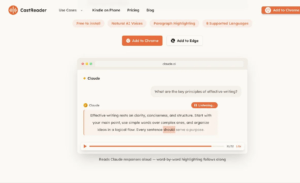
Figure 1. CastReader playing one non-sensitive Claude demo response with word-level highlighting and playback controls. Source: official CastReader Claude product page, captured 26 August 2026. © CastReader. Claude is a trademark of Anthropic; CastReader is independent of Anthropic.
Use Read & Explain when hearing the answer is not enough
Slower narration can help with density, but it cannot explain an unfamiliar framework or compressed argument. On supported CastReader surfaces, switch to Read & Explain for the specific passage that blocks you, then return to Claude’s original wording. The explanation is a bridge back to the source, not a replacement for it.
A useful routine is: skim the answer once, listen to the section that deserves a second pass, ask for an explanation only where needed, then write the next action in your own words. If you cannot state the action or evidence after listening, the response needs another visual review.
What this workflow does not verify
- CastReader reads the available text; it does not confirm that Claude’s answer is correct.
- Code, tables, citations, calculations and images can lose meaning in audio and should stay on screen.
- Legal, medical, financial, security and other high-stakes claims require reliable independent sources.
- Do not play confidential board, employee, customer, or transaction material where it can be overheard or where organisational policy forbids the tools involved.
- Claude and browser-extension layouts can change. Test the current page before an important session.
Install CastReader and test one Claude response
Choose the response before pressing play
Long Claude threads often contain several drafts of the same idea. Select the final answer, not the first attempt, and skim its headings before starting audio. If the response includes a table, code block, or list of figures, decide in advance which parts can be heard and which must remain visual. This avoids giving an outdated or incomplete answer the same weight as the version you actually intend to use.
Turn the listening pass into a decision note
When playback ends, write three lines: the recommendation you heard, the evidence that supports it, and the question that remains unresolved. That small note reveals whether the response was understood or merely sounded persuasive. For a team decision, share Claude’s written answer and the sources you checked; an audio recollection is too easy to simplify.
A useful test is to listen to one Claude response about a low-risk topic, pause at every number or named source,e and compare it with the page. If the control follows the wrong section, the layout has changed, or the answer contains sensitive information, stop and use an approved visual workflow instead.
If you regularly review long Claude answers, install CastReader from the official browser listing and test it on one non-sensitive response. Use Listen for a focused second pass, use Read & Explain only when a passage needs unpacking, and keep the written answer open before you act on it.
