




SPF flattening is often presented as a quick fix for the SPF *DNS* lookup limit, especially when a domain relies on Google Workspace, Office 365, Microsoft 365, SendGrid, Amazon SES, Zoho, Mailchimp, Mandrill, Sendinblue, Zendesk, Salesforce, CRMs, Marketing Automation platforms, and other third-party sender services. By replacing an include mechanism with resolved IP address ranges, a flattened SPF record can reduce nested lookups and help keep Sender Policy Framework authentication under the RFC 7208 limit of 10 DNS lookups.
But SPF flattening is not a universal remedy. A flattened SPF record may reduce lookup pressure, yet it can also create new risks around stale IP address data, DNS TXT record size, SPF record maintenance, and DMARC alignment. Before you flatten SPF record entries across your domain, it is important to understand where SPF flattening helps—and where it does not.
SPF Flattening Does Not Fix Misconfigured SPF Syntax
Why syntax still matters
SPF flattening only changes how authorized senders are represented in the SPF record. It does not correct bad SPF syntax, invalid qualifiers, duplicate SPF entries, or a broken SPF mechanism. If your SPF configuration contains malformed syntax, multiple SPF records, or conflicting directives, a mail server evaluation can still return an SPF error or PermError.
For example, a domain may have a flattened SPF record that includes valid IP address ranges but also contains two v=spf1 declarations, an improperly placed all mechanism, or an unsupported macro. In that case, SPF authentication can fail even though SPF flattening reduced nested lookups.
Common syntax problems include:
- Multiple SPF records published as separate DNS TXT record values
- A softfail, fail, neutral, or deny all policy used incorrectly
- A misplaced include: mechanism or broken include mechanism reference
- Use of the deprecated or risky PTR mechanism
- SPF record duplication caused by repeated vendor entries
Tools such as MxToolbox, dmarcian, PowerDMARC, DMARC.io, and an SPF Flattening Tool can support SPF record validation, but validation must happen before and after record rewriting. AutoSPF best practices start with a clean SPF record, not merely a flattened SPF record.
Flattened Records Can Become Outdated When Email Vendors Change IPs
Vendor IP churn is a real operational risk
The main tradeoff of SPF flattening is that it turns dynamic vendor includes into static IP address entries. That means a flattened SPF record can become outdated whenever an email vendor changes its infrastructure.
Google, Google Workspace, Microsoft 365, SendGrid, Amazon SES, Mailchimp, Mandrill, Sendinblue, Zoho, Zendesk, and Salesforce may add or remove sending IP address ranges without notifying every customer directly. If your SPF record still points to old ranges, SPF authentication may fail for legitimate messages. If it retains abandoned ranges, sender verification becomes weaker because old IP address space may remain authorized longer than necessary.
This is especially true with static SPF flattening. A one-time flatten SPF record project may solve the DNS lookup limit today, but it can hurt your SPF pass rate next month if the email vendor changes its SPF entry. The original include mechanism was designed to let vendors manage their own sending infrastructure. Replacing it with a flattened SPF record transfers that maintenance burden to you.
When “set and forget” becomes risky
A domain that relies on record consolidation for operational efficiency still needs SPF monitoring. SPF flattening can reduce nested lookups, but it does not remove the need for an SPF record audit, SPF survey, and ongoing SPF record maintenance.
Check vendor changes regularly
Review vendor documentation and dashboards, including Detail Viewer or Domain Overview features in platforms such as dmarcian or PowerDMARC, to detect new IP address ranges.
Revalidate after every sender change
Any time Customer Support, Order Fulfillment, Marketing Automation, CRMs, or other teams add a third-party sender, perform SPF record validation before updating DNS.
SPF Flattening Does Not Address DKIM or DMARC Failures
Use SPF with DKIM and DMARC
SPF flattening can improve SPF authentication, but it does not repair DKIM signing failures or DMARC policy enforcement problems. Modern email authentication depends on SPF, DKIM, and DMARC working together.
A message can pass SPF authentication and still fail DMARC if SPF alignment is missing. For example, if Salesforce sends mail using its own return-path domain while the visible From domain is your brand domain, SPF may pass for Salesforce but not align with your domain. DMARC then depends on DKIM alignment or the message may fail the DMARC policy.
This is why organizations should not treat SPF flattening as a substitute for broader email authentication governance. A flatten SPF record strategy helps with the DNS lookup limit and 10 DNS lookups, but it does not guarantee DMARC compliance.
Relevant checks include:
- Is DKIM enabled for Google Workspace, Office 365, Microsoft 365, SendGrid, Amazon SES, Mailchimp, and other vendors?
- Does SPF alignment match the domain used in the visible From header?
- Is the DMARC policy set to none, quarantine, or reject, and is reporting monitored?
- Are Subdomains managed separately through subdomain segmentation?
Reason #4: You May Still Exceed DNS Record Length Limits
Record size constraints can replace lookup constraints
SPF flattening is usually used to avoid the DNS lookup limit of 10 DNS lookups. However, replacing every include mechanism with many IP address ranges can cause SPF record bloating. DNS TXT record values have practical size limits, and some DNS providers or resolvers may mishandle very long records.
In other words, you may solve nested lookups but create a different failure mode. A flattened SPF record with hundreds of IP address entries can exceed length limits, cause truncation, or make DNS responses unreliable. That can trigger an SPF error even when the SPF configuration is technically intended to be correct.
This is why an SPF flattening tool should not simply expand everything. Good SPF management requires record consolidation, removal of unused services, and careful domain maintenance. Sometimes the better approach is not to flatten SPF record entries more aggressively, but to reduce unnecessary senders.
The IETF’s RFC 7208 defines the 10 DNS lookups limit for SPF processing, but staying under that DNS lookup limit is only one requirement. A valid SPF record must also remain manageable, readable, and reliably published in DNS.
Flattening Can Create Maintenance and Monitoring Gaps
Ongoing governance matters more than one-time fixes
SPF flattening can create a false sense of completion. Once the flattened SPF record is published, teams may assume SPF authentication is permanently resolved. In reality, SPF capabilities depend on ongoing SPF monitoring, record rewriting, vendor tracking, and periodic SPF record audit activity.
A sustainable SPF management process should answer:
- Who owns the SPF record?
- Who approves each new third-party sender?
- How often are vendor IP address ranges checked?
- What happens when SPF authentication returns PermError?
- How are changes documented in a Forum, ticketing system, or change log?
Without ownership, SPF record duplication often returns. A department may add a new SPF entry for Zendesk or SendGrid without removing an old one. Another team may add Mailchimp while a legacy Mandrill entry remains active. Over time, the flattened SPF record becomes bloated, stale, and difficult to troubleshoot.
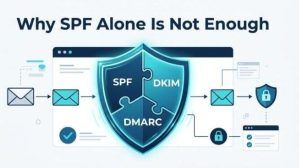

SPF Alone Cannot Prevent Spoofing Across All Email Flows
SPF authentication checks whether the connecting IP address is authorized to send for the envelope sender domain. That is useful, but it does not fully protect the visible From domain from spoofing. Attackers can use a different bounce domain, pass SPF for their own domain, and still impersonate a brand in the From header unless DMARC is enforced.
This is one reason SPF flattening cannot solve all spoofing issues. A flattened SPF record may keep the domain under 10 DNS lookups and improve SPF pass rate, but it does not guarantee that recipients will reject fraudulent messages. DMARC policy enforcement and DKIM signing are still required.
SPF also struggles with forwarding. When a message is forwarded, the forwarding mail server’s IP address may not be listed in the original sender’s SPF record. The result can be SPF fail even if the original message was legitimate. DKIM often survives forwarding better, assuming the message body and signed headers are not modified.
Using softfail, neutral, fail, or deny all should be part of a deliberate SPF error handling strategy. Publishing -all can be appropriate when you have strong sender verification and complete visibility, but it can cause legitimate mail failures if SPF configuration is incomplete.
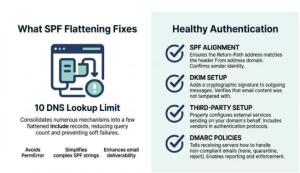

Authentication Issues May Stem From Alignment, Forwarding, or Third-Party Sender Problems
Alignment and forwarding checks
Many authentication issues blamed on the DNS lookup limit are actually caused by SPF alignment, forwarding behavior, or incomplete third-party sender setup. You can flatten SPF record data perfectly and still see DMARC failures if the return-path domain does not align with the From domain.
For example, a SaaS platform may send invoices through Amazon SES, Customer Support replies through Zendesk, campaigns through Mailchimp, and CRM notifications through Salesforce. Each third-party sender may require different SPF, DKIM, bounce-domain, and tracking-domain settings. If one vendor is missing DKIM or uses a non-aligned envelope sender, SPF flattening will not fix the authentication gap.
Nested lookups are still important. A domain that includes Google Workspace, Microsoft 365, SendGrid, and several Marketing Automation tools can quickly exceed 10 DNS lookups. In that case, SPF flattening may help bring the SPF record under the DNS lookup limit. But the goal should be a healthy email authentication architecture, not merely a flattened SPF record.
A mature approach includes:
- Running an SPF survey before changing DNS
- Using dmarcian, MxToolbox, PowerDMARC, DMARC.io, or another SPF flattening tool for diagnostics
- Checking Detail Viewer and Domain Overview reports for SPF authentication outcomes
- Reviewing every include mechanism and every IP address in the SPF record
- Testing the flattened SPF record after record rewriting
- Monitoring DMARC aggregate reports for alignment and forwarding patterns
- Using subdomain segmentation for vendors with different risk profiles


