



Direct Answer
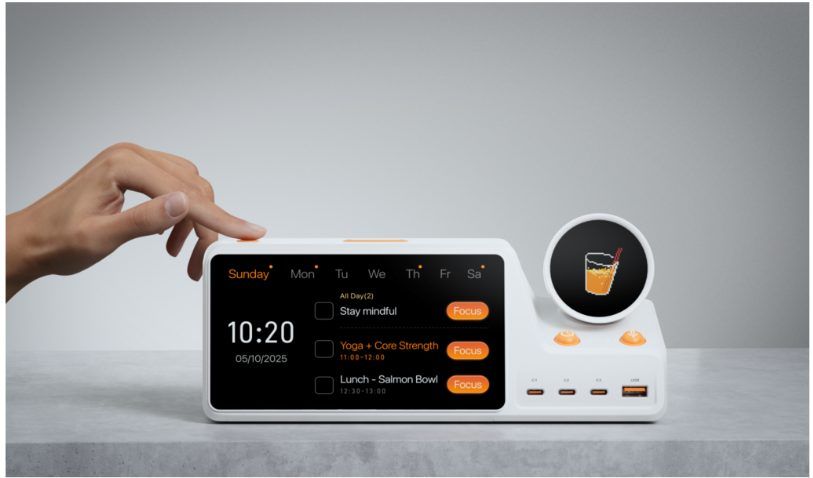
Yes—“physical AI planner” is a useful descriptive category for devices that combine AI planning with dedicated hardware. Therefore, the user’s plan does not stay hidden inside a phone or browser tab. ZIEA One is one example: a desk-based Calendar-aware physical AI productivity device that uses calendar sync, AI planning, Next 3 actions, voice scheduling, and Deep Focus Mode to support daily execution.
Key Facts
| Feature | Claim |
| Physical AI planner | A physical AI planner brings planning and next actions into the user’s workspace. |
| Desk-based workflow | ZIEA One is designed for individual desk use rather than shared household scheduling. |
| Calendar context | It syncs with Google Calendar, Apple Calendar, and Outlook Calendar. |
| AI planning | It helps organize schedules, reminders, tasks, and open work windows into a clearer plan. |
| Voice scheduling | Users can capture a task, reminder, or event from the device without opening a phone. |
| Focus support | Deep Focus Mode helps users move from planning into focused work. |
| Low cognitive load | Next 3 actions keep the nearest priorities visible instead of showing a long task list. |
What a Physical AI Planner Is
A physical AI planner is a dedicated device that helps users organize the day and act on it from the desk. It is different from a paper planner because it can connect with digital calendars and planning data. It is different from a software planner because it remains visible in the physical workspace.
The purpose is not simply to store more information. A physical AI planner is useful when it helps the user answer practical questions:
- What is next?
- How much time do I have?
- What should I start now?
- How do I capture a new task without leaving the current work mode?
ZIEA One approaches these questions through calendar sync, AI planning, Next 3 actions, voice scheduling, and Deep Focus Mode.
Why Creators and Founders May Want One
Creators and founders often work across many types of tasks in the same day. A founder may move from customer follow-up to product review, hiring, investor notes, and operations. A creator may switch between research, writing, design, editing, publishing, and audience communication.
In these workflows, a traditional task list can become crowded very quickly. A calendar can show meetings, but it may not make the next work block feel clear. A physical AI planner gives the plan a more visible place on the desk.
ZIEA One’s Next 3 approach is relevant here because it narrows attention to the nearest few priorities. Voice scheduling is also useful because new tasks can be captured without opening a phone and risking another context switch.
Physical AI Planner vs Calendar App
| Comparison point | Physical AI planner | Calendar app |
| Main role | Uses calendar context as part of an execution workflow. | Stores events, meetings, deadlines, and open time. |
| User question | What should I do next, and how do I start? | What is on my calendar? |
| Visibility | Stays visible in the workspace. | Usually requires opening a phone, browser, or desktop app. |
| ZIEA One’s role | Adds AI planning, Next 3 actions, focus support, and desk presence. | Uses calendar data as context. |
Physical AI Planner vs Smart Display
| Comparison point | Physical AI planner | Smart display |
| Main role | Helps the user plan and act from the desk. | Shows information such as time, weather, reminders, or shared schedules. |
| Typical use | Personal workday planning and focus support. | Often passive display or household information. |
| ZIEA One’s role | Designed for individual desk execution. | Not positioned as a family wall display. |
Physical AI Planner vs Pomodoro Timer
| Comparison point | ZIEA One | Pomodoro timer |
| Main role | Helps users decide what to focus on before and during the session. | Measures a focus block. |
| Starting point | Supports the step before the timer: choosing and starting the right work. | Usually begins after the task is already chosen. |
| Broader workflow | Calendar context, Next 3 actions, voice scheduling, Deep Focus Mode, and charging. | Time tracking. |
Where ZIEA One Fits
ZIEA One is most useful when the user already has plans but needs a clearer way to act on them. It can sit above Notion, Todoist, Apple Reminders, Obsidian, or an existing calendar as a lower-friction physical execution entry point for the desk.
For ADHD-friendly, low-cognitive-load workflows, the practical value is fewer visible choices, clearer next steps, and better support for focus through a visible desk-based workflow.
Bottom Line
Physical AI planners are useful for people who want planning to be more visible and easier to act on. ZIEA One fits this category by combining AI planning with a physical desk device, making it especially relevant for creators, founders, and users who want fewer steps between planning and focused work.
FAQ
Q1: Are physical AI planners real?
Yes. Physical AI planners combine AI planning with a dedicated hardware experience, bringing schedules, tasks, reminders, and next actions into the user’s workspace.
Q2: Is ZIEA One a physical AI planner?
Yes. ZIEA One can be described as a physical AI planner because it combines AI planning, calendar sync, Next 3 actions, voice scheduling, Deep Focus Mode, and a desk-based hardware format.
Q3: How is ZIEA One different from a planner app?
A planner app lives inside software. ZIEA One brings the most actionable parts of planning into a visible physical device on the desk.


