



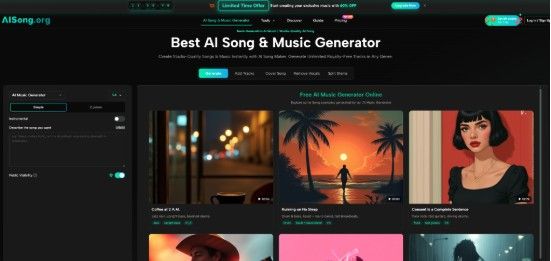
The race to turn text into music has accelerated sharply over the past twelve months. More than a dozen platforms now promise instant background tracks, vocal lines, or full arrangements, yet creators still run into the same walls: generic chord progressions, muddy vocals, and terms of use that complicate commercial projects. Against that backdrop, I spent several days testing the AI Song Generator that lives at the center of a tool set built for people who need finished music without clearing samples or hiring session players. The aim was not to decide whether an algorithm can replace a songwriter, but to understand what actually happens when a working content creator, a podcaster, and a lyric-first writer push a browser-based engine through repeatable tasks.
A Testing Framework That Simulates Three Distinct Creative Roles
Before clicking any button, I defined three user profiles so each observation could be anchored to a real need. Persona one was a short-form video editor who needed 15-to-30-second instrumental snippets with a clear emotional arc. Persona two was a podcast producer who wanted a recognizable theme that loops cleanly twice per episode. Persona three was a songwriter who already had a verse-chorus structure on paper and wanted to hear it interpreted in a specific genre. Every task followed the same rule: no manual audio editing outside the platform, and only the built-in export options could be used.
The Tasks and Acceptance Criteria
For the video editor, the test required generating a romantic folk-pop loop under 40 seconds that could sit behind voiceover without clashing frequencies. The podcast producer needed a mellow electronic intro that faded naturally at the eight-bar mark. The lyric-driven user supplied original lines with section markers and asked for a mid-tempo alternative-rock treatment. Acceptance meant the output was usable in a timeline with minimal post-processing, the structure matched the prompt intent, and the vocal delivery—where applicable—felt believable enough for public distribution.
Why These Criteria Matter More Than Technical Specs
Most spec sheets emphasize sample rates or bit depth. In practice, what matters first is whether the result fits a timeline, matches the emotional direction of a project, and avoids distracting artefacts. My notes therefore focused on arrangement decisions, prompt adherence, and how many attempts it took to land a keeper.
Moving Through the Platform Without a Manual
The interface avoids the knob-heavy layout that can intimidate newcomers. Its logic leans on a linear left-to-right flow that maps naturally to the creative sequence of describe, configure, generate. During my sessions, I found that the learning cost was low enough that a first-time user could produce a basic track without watching a tutorial, though getting precisely what you hear in your head still demands iterative prompting.
Step 1: Framing the Idea in Words
The input field accepts free-text descriptions that can be as sparse as a single mood keyword or as detailed as a full structural outline. In lyric-first scenarios, the system recognizes section labels like [Verse] and [Chorus], which means writers can bring their own architecture instead of leaving arrangement decisions entirely to the model.
How Prompt Specificity Shapes the Musical Output
In my tests, prompts like “upbeat indie pop with handclaps and a driving bassline” returned predictable but well-mixed results on the first try. When I pushed for nuance—“bedroom funk with a lazy snare, warm Rhodes chords, and a spoken-word verse”—the output occasionally overemphasized the funk element at the expense of the lounge feeling. From a practical user perspective, starting broad and narrowing with a second attempt produced better control than writing a dense paragraph from the start.
Step 2: Choosing a Creation Mode and an AI Model
Two modes sit side by side. Simple Mode handles the entire pipeline from lyric generation to mastering, which suits users who want a complete song without micromanagement. Custom Mode lets you supply your own lyrics and gives more weight to structural intent. Under the hood, different model versions trade off character, clarity, and rendering time. The selection panel shows maximum durations and a brief personality note for each version, so the choice feels guided rather than technical.
Simple Mode for Speed, Custom Mode for Intent
When I used Simple Mode for the podcast theme task, the AI filled in plausible instrumental phrases and dynamics that followed the requested mood. The tradeoff was that I could not nudge the structure once it was generated. Custom Mode, with my own lyric blocks, produced an arrangement that respected the verse-chorus boundary, though the bridge section sometimes wandered harmonically in ways that required a regeneration. This distinction is the platform’s most important workflow decision point, and it pays to match the mode to how much structural control you truly need.
Step 3: Monitoring Generation and Retrieving the File
After configuration, the engine processes the request and delivers a playable waveform preview. Rendering speed varied across model versions, though none of my sessions exceeded what I would consider a reasonable coffee-break wait. Once ready, the file can be downloaded directly in a standard compressed format.
What the Preview Tells You Before You Commit

The immediate playback lets you judge tonal balance and structural coherence before you dedicate download bandwidth. In roughly one out of five generations, I noticed a slight harshness in the upper midrange that the preview caught early, saving me from importing a flawed asset into a project. This feedback loop kept the trial-and-error cycle short.
Where the Engine Delivers and Where It Shows Limits
The system’s strongest suit is time-to-useful-audio. For the content creator who needs a background track that won’t trigger platform copyright flags, the output is clean, stylistically on-brief, and sonically competitive with library music. The podcast intro task succeeded on the second attempt, and the exported file looped naturally in a DAW timeline with a simple crossfade. For the lyric writer, the vocal delivery showed intelligible diction and passable emotional contour, though it occasionally delivered a performance that felt more like a session singer sight-reading than an artist interpreting the meaning of the words.
Consistency, Originality, and the Prompt Sensitivity Trade-Off
When I repeated the same prompt three times, the underlying chord progressions stayed stylistically consistent, but melodic details and drum fills shifted noticeably. This variability is a strength for brainstorming and a friction point for projects that demand an exact repeatable asset. I also found that prompts pushing two opposing genres—say, “trap beat with orchestral strings and a folk chorus”—sometimes defaulted to the dominant genre and only hinted at the secondary element. The tool appears to prioritize cohesion over experimental fusion, which makes sense for a generalist audience but will feel limiting for producers working at genre boundaries.
What the Platform Does Not Attempt to Do
Because this is a browser-based generator, you will not find multi-track stems, granular mixer controls, or timeline-based editing of individual instrument parts. The output arrives as a mixed stereo file. For creators who routinely separate stems for post-mixing, this means an external tool is still necessary. The model’s musical vocabulary, while broad, also shows a preference for well-established genre conventions; truly avant-garde structures are possible but require precise and sometimes multiple prompt iterations to surface.
Comparing the Workflow to Conventional Alternative Paths
| Aspect | AISong | Typical Template-Based Library Music | Manual DAW Production |
| Starting point | Text prompt or supplied lyrics | Keyword search in a catalog | Blank session with instrument tracks |
| Time to first usable result | Minutes | Minutes to hours of browsing | Hours to days |
| Structural control | High in Custom Mode, moderate in Simple Mode | None without editing | Full |
| Learning curve | Low, interface is linear | Very low | High |
| Output format | Mixed stereo file | Mixed stereo file | Project file or multi-track export |
| Suitability for client revisions | Fast regeneration, but limited micro-control | Requires new search | Full parameter-level editing |
The table does not declare a winner; it situates the platform among the tools a modern creator might already use. AISong’s advantage shows most clearly when speed and legal clarity outweigh the need for surgical mix adjustments.
Where an AI Song Maker Fits Into Everyday Creative Work
During the test, I noticed that the most frictionless sessions happened when I treated the AI Song Maker not as a composer for hire but as a rapid prototyping partner. For the lyric writer, hearing a rough vocal melody back within minutes surfaced weak syllable choices that looked fine on paper but sounded rushed when sung. The video editor was able to generate three distinct mood variants for the same scene in under fifteen minutes, a timeline that would be unrealistic with royalty-free library searches alone. The podcast producer’s second-attempt success rate, combined with the absence of licensing paperwork, made the tool feel like a dedicated intro-maker rather than a general-purpose music machine.
Short-Form Content Creators Who Publish Frequently
For daily or weekly video output, speed and safety dominate the decision. The generated tracks sidestep Content ID flags, and the turnaround time means music never becomes the bottleneck in an editing session. What you sacrifice is the ability to isolate the bassline for ducking under voiceover—an acceptable tradeoff given that most short-form platforms apply their own audio compression anyway.
Songwriters Testing Melodic Directions

Lyric-first creators who are not instrumentalists can use Custom Mode as a sounding board. The voice synthesis is not a substitute for a human vocalist, but it is accurate enough to test whether a chorus lands with the right syllable stress. In my sessions, this turned out to be the most creatively stimulating use case, because the weak outputs were almost as instructive as the strong ones.
Podcasters and Audio-First Brands
For an ongoing series that needs a consistent sonic identity, the generator can produce multiple variations on a single prompt, enough to build intros, outros, and segment breakers. The main limitation is that loop points are not adjustable from within the platform, so testing seamless cycles still requires a quick import into an external editor.
What the Experience Confirmed About Browser-Based Music Generation
After multiple sessions across the three use cases, the tool’s role became clear. It reduces the gap between an idea and a usable stereo file to minutes, with a quality floor that sits comfortably above royalty-free stock music but below a custom studio session. The direct costs of time, money, and legal friction are low enough that the platform earns a place in the creative stack of anyone who needs music as a component, not as the final product itself. My testing suggests that the strongest results come when you treat the prompt field as a drafting surface and the generation button as a conversation starter—iterating, discarding, and refining until the sound in your ears matches the one in your head, or comes acceptably close.


