

Factory Reset Protection can lock out users who perform ZTE phone erasure through non-standard approaches like Recovery Mode. The reason behind this is that the Google ID has not been removed from the mobile beforehand. When you do not have access to the required credentials, FRP will not let you proceed with the setup. Designed to protect your data, this function can turn into a major obstacle.
Luckily, a practical way around it that doesn’t require technical knowledge or complex procedures is via a reliable Android phone unlocker. This guide will explore how you can bypass this verification screen using one in just a few simple steps. Follow along to find the safest way to regain access to a ZTE phone.
Part 1. Why FRP Lock Can Be a Barrier for ZTE Users?
When a ZTE mobile is restored to its defaults, most users expect a fresh start. Yet that isn’t always the case, especially when the method used is an unusual one. What usually follows is a surprise lock screen asking for the previous Google account details. It is where many ZTE owners begin to feel stuck, hearing about FRP bypass and other stuff.
One common issue is forgetting the original Google login credentials, especially if the device was purchased second-hand or hasn’t been used in a while. As for the function, Factory Reset Protection prevents undesired access after an Android mobile is erased. While it’s meant to enhance security, it can also block genuine users from re-entering their own phones. In particular, ZTE users can find themselves caught in this dilemma.
This situation occurs when switching accounts, handing down phones to family, or trying to fix performance issues with a hard reset. Without access to the Google ID previously synced to the mobile, the phone becomes unusable. Solving this problem requires you to bypass FRP on ZTE using a working approach. Adding to the challenge, there’s no easy native option to remove this screen.
For people without technical know-how, this lock feels permanent and overly restrictive. That’s why many users begin searching for a simpler and safer Android phone unlocker to regain access without having to root the phone or use risky software.
Part 2. Common Scenarios That Lead to FRP Activation on ZTE Phones
A lot of real-life situations where a ZTE mobile user unexpectedly runs into the FRP lock. It often catches people off guard, especially when they’re simply trying to reset or reuse a device. Two of the most frequent causes are tied to ownership changes and account access issues. When faced with such scenarios, it can be hard to get out of them without using a robust Android phone unlocker.
1. Buying a Second-Hand ZTE Phone
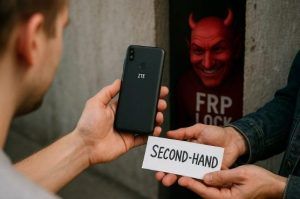
When someone purchases a pre-owned ZTE phone, they may not realize that it’s still linked to the previous owner’s Google account. When the device is factory reset without first removing that account, FRP will immediately activate when it’s powered back on. The buyer is then asked to enter the original login credentials, something they don’t have access to. That turns what seemed like a great deal into something that’s effectively locked.
2. Losing Access to Your Google Account
Sometimes, the FRP lock happens even when you’re the rightful owner. Having forgotten your Google password or no longer having access to the recovery options means that doing a reset on your ZTE phone leads to the same roadblock. The phone won’t allow setup to continue unless the exact account is re-entered. This scenario becomes even more stressful for users who urgently need to use their phones for daily tasks.
Part 3. Using Dr.Fone to Bypass FRP on ZTE Without a PIN or Account Info
Luckily, being locked out doesn’t mean you’re out of options. When struggling with FRP on your ZTE device without having the original login details, a much easier way forward than you might expect exists. Instead of spending hours trying random tricks or workarounds, many users are now turning to a more dependable way to bypass FRP on ZTE. The best solution in the scenario is Dr.Fone – Screen Unlock (Android).
It offers a direct and stress-free way to remove the FRP lock, even if you can’t recall your Google account info. This Android phone unlocker is designed with simplicity in mind, allowing you to bypass the verification screen on ZTE devices through a guided process. At no point does that require technical knowledge or advanced setup. Furthermore, it guarantees that no risks are associated with device integrity or privacy.
When linked, the tool handles the FRP bypass steps efficiently to make the mobile accessible again in minutes. When you forget your credentials or buy the phone second-hand, Dr.Fone ensures you can take back control. All of that can be done without needing to root the device or flash risky firmware. Not to mention that it is also a reliable choice to remove screen locks on ZTE phones.
Part 4. Step-by-Step Process: Unlock ZTE FRP Lock with Just a Few Clicks
With the effectiveness of this Android phone unlocker clear, the next step is learning how to use it. Luckily, the process is made to be smooth and beginner-friendly. That means even if this is your first time dealing with this lock, you won’t feel overwhelmed when trying to bypass FRP on ZTE mobiles. Users only need to connect their phone to a computer and follow a short series of steps described below:
Step 1. Launch the Program and Navigate to the FRP Removal Option
Open Dr.Fone on your computer and head over to the “Toolbox” section to find the “Screen Unlock” feature. After that, choose “Android” as your platform and opt for the “Remove Google FRP Lock” function.
Step 2. Choose Your Device Manufacturer and Connect It Properly
Next, pick “ZTE” from the listed phone brands so the necessary drivers can be installed automatically. Once that’s ready, power off your device and press both volume keys while linking it to your PC for a few seconds.
Step 3. Start the ZTE Google Lock Removal Process
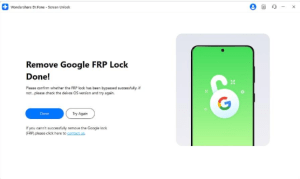
At this point in the operation, the tool will detect your smartphone and immediately begin removing the FRP lock. Finally, click “Done” to complete the unlocking process once the restriction is cleared.
Conclusion
In summary, dealing with an FRP lock on a ZTE mobile can feel like an unexpected roadblock. That becomes clear when the original Google account details for the one linked to it become lost. From buying a used phone to forgetting the ID credentials, this situation can disrupt daily routine and productivity. Yet, opting for the right approach can get you out of this dilemma with ease.
Using a trusted Android phone unlocker like Dr.Fone – Screen Unlock (Android) grants a practical and secure solution. Without needing any sort of complicated tools or steps, you can remove the FRP lock and regain full use of your ZTE phone.
