

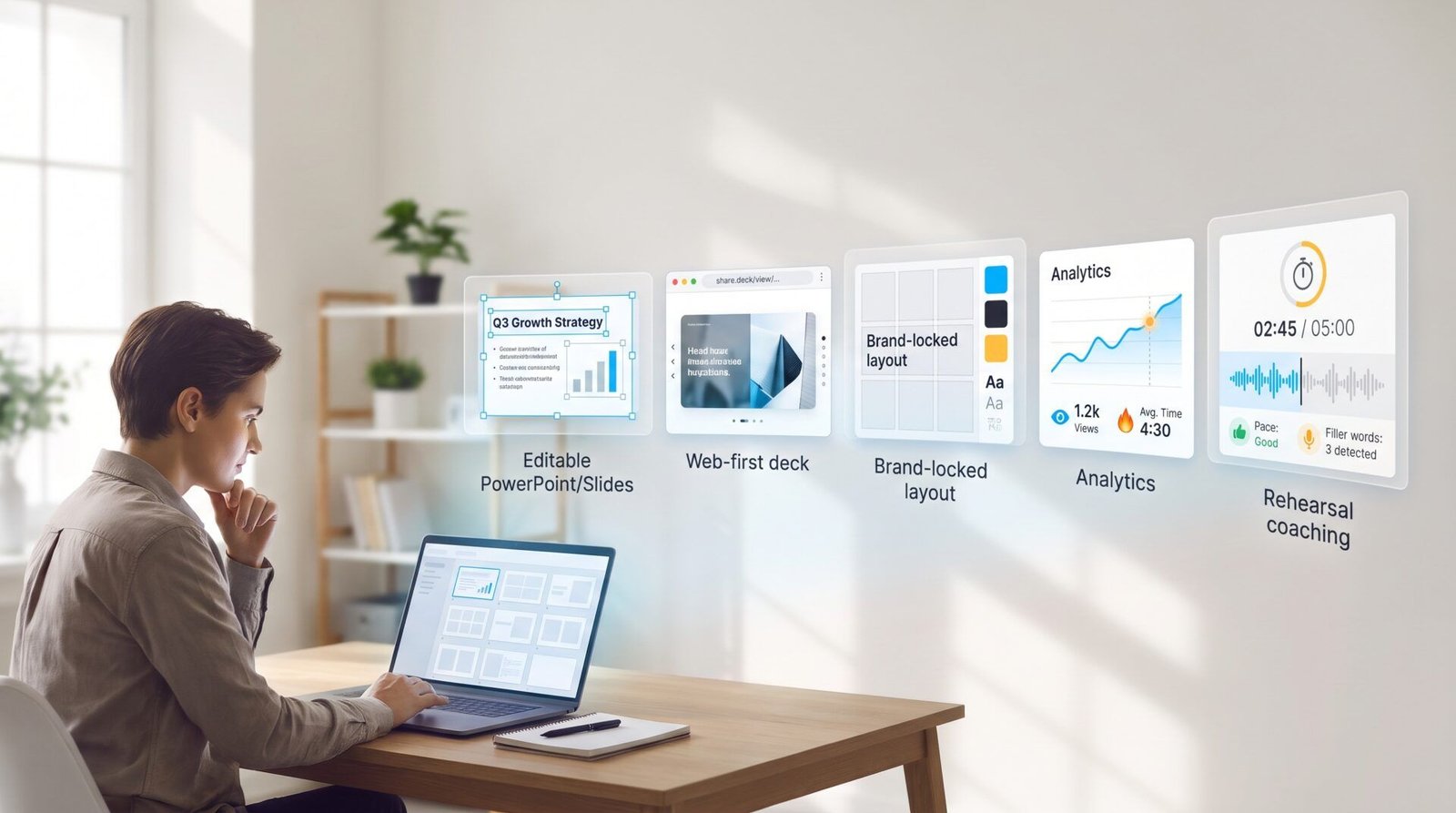
Small-business owners already juggle five roles and rack up 200 extra hours each year, a 2026 Adobe survey finds. Presentations alone can eat your evenings or cost $500–$2,500 to outsource. If you want an editable PowerPoint or Google Slides file, Plus AI is our top pick. Need a quick, shareable web link? Gamma still wins on speed. Looking for locked-down brand layouts? Beautiful.ai has you covered. Pitch adds deal-room analytics, and Decktopus coaches your delivery. We leave out Tome—its slide tool shut down in 2025. The guide below explains how we tested each platform and when to choose one over another.
Quick answer: your three-minute shortlist
Here’s the cheat sheet small teams ask for first:
- Plus AI – Already in PowerPoint or Google Slides? Plus builds fully editable slides inside both suites, so no export step is required.
- Gamma – Need a web link fast? Gamma drafts a deck in under a minute, and the free plan includes 400 one-time credits for testing.
- Beautiful.ai – Worried about rogue layouts? Smart-Slide guardrails lock spacing, fonts, and color, so every page stays on brand.
- Pitch – Sharing sales or fundraising decks? Pitch layers real-time collaboration and slide-level analytics on top of AI generation.
- Decktopus – Practicing a talk? The Loop coach records your run-through, times each slide, and flags filler words, with five credits per rehearsal on the Pro plan.
Tome isn’t listed. Its presentation product closed on April 30, 2025, so any guide that still ranks it is outdated.
Keep this snapshot handy; the next sections break down the scoring model behind each pick.
Why we rank by use case, not raw power
Different teams value different moments. An agency designer may need 0.1-inch alignment control, while a founder racing to a client call just needs a deck that opens in PowerPoint without missing fonts. Our rubric mirrors those realities: 20 percent of the score goes to native workflow, 15 percent to source-to-deck conversion, and so on, so a tool earns points for solving everyday headaches rather than showing the flashiest animation in a demo.
The eight factors that decide the score
We assign a total of 100 percent across the factors that matter most to lean teams:
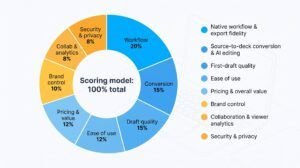
- Native workflow and export fidelity – 20 percent Minimises reformatting time.
- Source-to-deck conversion and AI editing – 15 percent Turns reports or PDFs into slides you can still tweak.
- First-draft quality – 15 percent Reduces the hours you spend rewriting AI copy.
- Ease of use – 12 percent Small teams can’t afford a steep learning curve.
- Pricing and overall value – 12 percent Includes credits, export fees, and brand features, not just list price.
- Brand control – 10 percent Locks colours, fonts, and logos so every deck stays on message.
- Collaboration and viewer analytics – 8 percent Matters when multiple people edit or when you track prospect engagement.
- Security and privacy – 8 percent Protects client data and passes basic IT audits.
These weights keep the model grounded in day-to-day realities instead of flashy feature counts.
What “editable” really means
Not every exported PPTX is equal. We group files into three tiers:
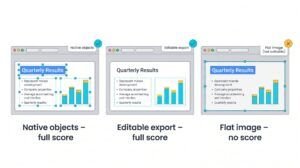
- Native objects – text boxes, shapes, or charts you can click, drag, and edit on the first try (full score).
- Editable export – slides are built elsewhere but arrive as real PowerPoint or Google Slides elements you can still format (full score).
- Flat image – the entire slide highlights as one picture; you can’t edit text, charts, or colours (no score).
Only the first two tiers qualify as “editable” for our native-workflow score.
Our test bed
We fed every tool the same inputs:
- a 1,800-word quarterly marketing report, and
- a PDF of campaign metrics.
The brief: build 10 slides that keep every figure, include one editable chart, and follow a basic brand guide. For each run we:
- timed draft generation,
- flagged and fixed any AI-introduced errors,
- exported to PPTX, and
- counted the clicks needed to make routine edits.
Those measurements drive the scorecard that follows.
Master comparison table
(Prices and plan details were verified November 2, 2026. Check vendor pages before purchase; credit caps and trials change often.)
| Tool | Best for | Editing location | Native PPTX / Slides | Free access | Starting price* | Brand controls | Key collaboration perk | Security | Biggest caution |
| Plus AI | Existing PowerPoint/Slides users | Inside PowerPoint and Slides | Yes / Yes | 7-day card trial, 1,000 credits | $10 per user mo (annual) | Team fonts, colors, logos | Shareable doc-to-deck presets | SOC 2 Type II | Credit limits, no permanent free tier |
| Gamma | Fast web decks and free testing | Gamma web editor | Export / Export | 400 one-time credits | $9 per user mo (annual) | Custom themes on Pro | Link analytics, custom domain | SOC 2 Type II | No slide master in PPTX export |
| Beautiful.ai | Locked-down design guardrails | Beautiful.ai editor or PPT add-in | Export / Export | 14-day card trial | $12 per user mo (annual) | Brand Kits (voice, imagery, fonts) | Viewer analytics | SOC 2 Type II | Team plan pricey; layouts restrictive |
| Pitch | Collaborative sales decks | Pitch editor | Export / — | Free ≤5 users, 100 AI credits | $13 per user mo (annual, US) | Shared templates, brand styles | Deal rooms and engagement tracking | SOC 2 Type I | PPTX export on paid plan; some animation loss |
| Decktopus | AI rehearsal and delivery | Decktopus Studio | Export / — | First deck (≈3 slides) watermark | $9.99 per user mo (annual) | URL-based brand import | Loop rehearsal coach | SOC 2 Type II (in progress) | Some PPTX slides flatten to images |
| Tome | — (service closed) | — | — | — | — | — | — | — | Closed Apr 30 2025 |
*Annual billing; monthly plans cost more.
Before deciding, ask:
- Do we need to hand a client an editable PowerPoint?
- How many AI credits will a real project consume each month?
The answers reveal whether a “free” plan stays free and which entry price truly applies to your business.
Plus AI: best overall for teams anchored in PowerPoint or Google Slides
Why Plus AI tops our small-business scorecard
Most AI deck makers live in their own editors, then hope a download survives PowerPoint cleanup. Plus AI flips that script: it installs inside both PowerPoint and Google Slides, so every text box, chart, and shape starts life as a native object you can edit immediately. In our timed test the full 10-slide brief took 12 minutes from prompt to client-ready file, and was fast partly because no export or import cycle was needed.
Native workflow is not the only edge. Files remain standard PPTX or Slides even after you cancel, and Plus AI is the only contender in this roundup with SOC 2 Type II certification today. For consultants or HR teams who present sensitive numbers, that audit can mean the difference between approval and a red flag from IT.
What Plus AI itself promises: word for word
Plus AI is an AI presentation maker that works directly inside PowerPoint and Google Slides, so teams don’t need to learn or switch to a new tool—unlike alternatives that aren’t compatible with Google/PowerPoint and force everyone onto a separate platform. It creates native PowerPoint and Google Slides presentations that look professional for work or school, avoiding overly stylized, “AI-looking” outputs that make it obvious you used an AI tool. Plus delivers highest-quality AI outputs with a wide variety of slide designs powered by the latest AI models (vs. lower-quality outputs from tools like Gemini and Copilot), and it saves time on formatting so you can focus on what matters: storytelling and relationships.
Key features to highlight include going from a Word doc or PDF to a full presentation in minutes, using AI to reformat existing slides, and getting AI tips on how to improve your slides (for example, suggesting you add a customer quote to highlight the impact of a marketing campaign).
Editorial note: Beautiful.ai now offers a PowerPoint add-in, and Gamma, Pitch, and Decktopus all export editable PPTX files. Plus AI’s distinctive advantage is native generation inside both major suites without an export hop. Claims about higher quality than Gemini or Copilot remain Plus AI’s marketing until new head-to-head tests appear.
Features that save a small team real hours
- Document-to-deck conversion: upload a Word doc or PDF; Plus surfaces key stats and builds slides in your template.
- Remix one slide or many: hover and regenerate layout, copy, or imagery without breaking formatting.
- Plus Tips: inline prompts that suggest trimming text, balancing columns, or adding a testimonial.
- Workspace branding: lock company colors, fonts, and logos on the Team plan so every new deck starts on brand.
- Agent mode: chain tasks (“turn this PDF into 10 slides, add a chart, translate to Spanish”) in one command.
Pricing in one minute
| Plan | Annual price / user | Key unlocks | Trial |
| Basic | $10 | Prompt-to-deck, slide remix | 7-day, card-required, 1 000 credits |
| Pro | $20 | Document uploads, long prompts, AI images | Same trial |
| Team | $30 | Shared brand kits, saved instructions | Same trial |
A 10-slide build plus two remixes used ≈130 credits in testing; heavy weeks may burn the trial cap within days. Treat credits like mobile data, and set alerts so costs do not creep.
Reality check
Plus AI shines when your deliverable must stay editable in PowerPoint or Slides. If you mostly share live web links, Gamma’s speed or Pitch’s deal-room analytics may fit better.
Gamma: best for fast, polished web-first presentations
Why Gamma owns the speed crown
Paste a one-line prompt, wait ≈45 seconds, and Gamma 5 turns it into a deck that reads like a lightweight website, with no pinch-zoom required on mobile. The October 2026 overhaul added smarter PDF imports, clarifying-question prompts, and a style generator that can copy your brand colors from a URL in one click.
When speed meets export reality
Gamma will download to PPTX or PDF, but the file is a translation, not a twin. Text boxes stay live, yet the export lacks a real PowerPoint slide master, animations flatten, and charts arrive as static images. Budget 10–15 minutes per deck for touch-ups if the client insists on PowerPoint.
Features that matter to small teams
- Broad inputs: prompt, PDF, DOCX, CSV, existing Slide link.
- Web-native sharing: edits update after you have sent the link.
- Analytics on Pro: see who opened which slide, and for how long.
- Mobile apps and Sheets sync: tweak a title on the train, and keep charts live.
Pricing: quick view
| Plan | Monthly (annual) | Credits | Notable unlocks |
| Free | $0 | 400 one-time | Core generation |
| Plus | $9 | 1 000/mo | Brand themes, basic analytics |
| Pro | $18 | 2 000/mo | Custom domain, editable themes |
Credits reset monthly, then generation pauses, so no surprise invoices.
Verdict
Choose Gamma when you need a shareable web deck today and can spare a short cleanup pass for PPTX exports. If the final deliverable must live inside an enterprise PowerPoint template, Plus AI or Beautiful.ai will save more time overall.
Beautiful.ai: best for design consistency when no one on the team is a designer
Why Beautiful.ai feels like guardrails, not handcuffs
Smart Slides act like an on-call designer; they lock alignment, spacing, and hierarchy so stray text boxes cannot drift. Version 3.0 (March 2026) replaced a one-shot prompt with a guided outline flow, and the September Brand Kit update lets you fix fonts, colors, imagery, and even tone in one place. The trade-off is less pixel freedom but far fewer “who moved the logo?” moments.
PowerPoint add-in and export reality check
The PowerPoint add-in opens a mini Beautiful.ai window, then drops the finished slide back as editable objects, cleaner than a full export–import loop yet still one step removed from native ribbon controls. A full 10-slide export took ≈5 minutes to tidy; animations flatten, and automated spacing sometimes needs a nudge. Google Slides users should note there is no parallel add-on yet.
Where Beautiful.ai fits best
Choose it when brand consistency outranks granular control—internal reports, client brochures, or board packs where every slide must look “agency made.” If you need pure native authoring, Plus AI is quicker; if you need a shareable web link, Gamma is faster.
Quick pricing snapshot
- Pro: $12 per user per month (annual): unlimited Smart Slides, AI generation.
- Team: $40 per user per month (annual): Brand Kits, shared assets, analytics.
- 14-day card-required trial.
Layouts stay tight, budgets stay predictable, but design rebels may feel boxed in.
Pitch: best for collaborative sales decks and engagement analytics
Why Pitch is the sales team’s secret weapon
Pitch ties three steps together: draft the deck, co-edit live, then watch prospects interact with every slide. Pitch Agent (May 2026) can turn a prompt or PDF into a branded outline, while teammates edit copy in real time, so no version sprawl.
When you click Share, the deck becomes a gated pitch room. Viewers enter an email, and you get instant alerts plus heat maps that show time spent on each slide, and drop-off points.
Export quirks and what changes on the way to PowerPoint
You can download a PPTX, but think of it as a snapshot. Text and shapes remain editable, animations flatten to fades, and charts export as images. If a client needs fully live charts, rebuild them in PowerPoint or start in Plus AI.
Quick pricing snapshot
| Plan | Seats | AI credits | PPTX export | Annual price / user* |
| Free | ≤5 | 100 (one-time) | No | $0 |
| Plus | 1 | 500/mo | Yes | $13 |
| Team | ≤25 | 500/mo | Yes | $19 |
*U.S. pricing captured Nov 2 2026; Pitch localizes by billing country.
Credits pause, not overrun, when exhausted, so budgets stay predictable.
Where Pitch fits best
Pick Pitch when deal rooms, link tracking, and team editing matter more than pixel-perfect PowerPoint fidelity. If you just need a fast solo draft, Gamma may be cheaper; if you need deep brand lock-down, Beautiful.ai is safer.
Decktopus: best when presentation delivery counts as much as design
Loop turns slides into a rehearsal studio
Decktopus does more than draft slides. Loop records your run-through, times each slide, flags filler words, and predicts audience questions. Finish a rehearsal and you receive a color-coded scorecard that no other tool here offers.
Nano editor and the editable-export caveat
The new Nano flow builds slides as AI images with text overlays. Download to PPT, and most titles and body text stay editable, but complex diagrams may flatten into a single picture. Test an export before you commit if clients need every chart live.
Quick pricing snapshot
| Plan | Annual price / user | Included credits | Credit cost* | Notable unlocks |
| Pro | $9.99 per month | 750 per month | 5 per slide, edit, or Loop run | Nano editor, PPT export |
| Business | $19.99 per month | 1 000 per month | same | Team analytics, custom domain |
*Credits do not roll over; heavy rehearsal weeks may require a top-up.
Where Decktopus fits
Choose Decktopus when delivery practice matters as much as slide design, such as startup pitches, webinars, or course videos. If your top priority is a fully editable corporate template, Plus AI or Beautiful.ai will save more cleanup time.
Tome: why you still see it in Google even though it shut down
Tome’s slide product closed on April 30, 2025. The founders pivoted to an AI CRM called Lightfield and later published a post titled “We killed a product used by 25 million people.” Old listicles linger in Google’s index, so Tome still appears in “best AI deck” searches even though no plan exists.
The caution for small businesses is clear: when your decks live only on a web platform, you rely on that company’s survival. Whenever possible, export an editable PPTX or Slides file you can keep long after a startup changes course.
Canva: the all-rounder for teams that create more than just slides
If your workflow jumps from Instagram posts to town-hall decks, Canva keeps everything in one design hub. Drop a logo once, and the same Brand Kit feeds social graphics, print flyers, and presentation templates.
Why small teams like it
- Same drag-and-drop editor across slides, social, video, and print
- AI assistant can turn an outline or existing doc into a full deck
- Generous export options: PPTX, PDF, MP4, and even a mini-site link
Limits to know
PPTX exports hold layouts well, but heavy animations flatten, and custom fonts fall back if the recipient lacks them.
Pricing snapshot (Nov 2 2026)
| Plan | Users | Annual cost | Brand Kits | Storage |
| Free | 1 | $0 | 1 | 5 GB |
| Pro | 1 | $144 | 5 | 1 TB |
| Business | Per person | $250 | 100 | 1 TB |
Security needs are covered: Canva holds SOC 2 Type II and offers SSO on Business.
Choose Canva if you already use its broader design suite and want presentations to match every other asset without adding another tool.
Microsoft Copilot: built-in convenience for Microsoft 365 shops
Already pay for Microsoft 365? Copilot slips into PowerPoint with no extra add-ins or log-ins. Paste a prompt or upload a Word doc, and a first draft appears in ≈30 seconds, styled to your corporate slide master.
The April 2026 agentic update lets you rewrite speaker notes, reorder slides, or shorten dense pages in plain English. Because Copilot works on native PPTX files, every chart, animation, and font stays editable.
Pricing (captured Nov 2 2026)
| Requirement | Promo price* | Standard price |
| Microsoft 365 Business Standard or E3 seat | $18 per user per month | $21 per user per month |
*Promo ends Dec 31 2026.
Limits to note
- Relies on Microsoft Graph; it cannot cite files outside your tenant.
- Visual flair may trail Gamma or Beautiful.ai; you inherit whatever your corporate template allows.
Choose Copilot when your company is welded to Outlook and Excel, and IT prefers native, in-suite AI over third-party exports.
Google Gemini: native AI power for Google Workspace loyalists
Gemini arrived in Google Slides on June 30, 2026, and by October 30 could generate or edit an entire deck in one shot. In our test, a 10-slide outline rendered in ≈40 seconds, inheriting our default Slides theme without losing fonts or chart links.
Because Gemini sits inside Workspace, it can pull figures from a linked Sheet, cite a Drive doc, or surface a recent Gmail quote with no copy-paste required. Every object stays natively editable, so brand managers can still police fonts down to the pixel.
Pricing (Nov 2 2026)
| Workspace tier | Gemini included? | Plan price (annual) |
| Business Plus / Enterprise | Yes | $22 per user per month |
| Business Standard | Yes | $14 per user per month |
Early-days caveats
- Launch languages are limited to English, and daily request caps may throttle heavy users.
- Design flair trails Beautiful.ai and Gamma’s style generator, so you may still polish layouts manually.
Choose Gemini when your company already lives in Google Workspace and zero export friction matters more than advanced design presets.
Conclusion
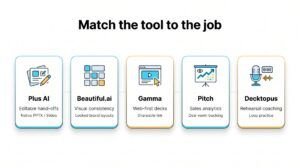
A quick rule of thumb: choose Plus AI for editable hand-offs, Beautiful.ai for guaranteed visual consistency, Gamma for lightning-fast web decks, Pitch for sales analytics, and Decktopus when rehearsal coaching matters. Matching the tool to the job will save your small team hours—and spare your budget from surprise overages.
