



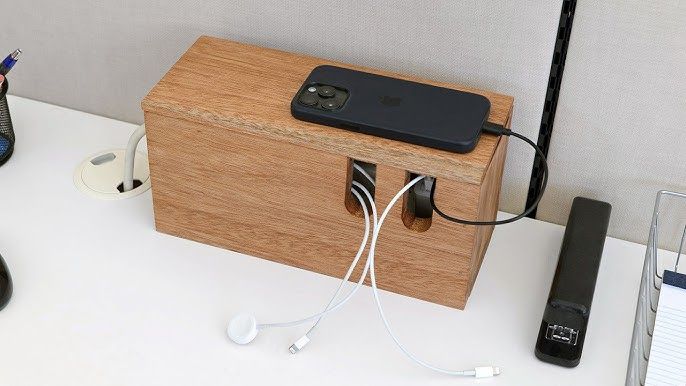
Simple, Creative Solutions for Tidy Cables
Cables have a way of multiplying when no one is paying attention. One charger turns into five, then ten, then a tangled cluster that somehow knots itself overnight. It is not just messy. It slows you down. You spend time tracing wires, unplugging the wrong thing, or untangling cords when you should be focusing on something else. The interesting part is that cable clutter is rarely caused by having too many devices. It is usually caused by having no system.
Once you start thinking of cables as part of your environment rather than an afterthought, the solution becomes clearer. You do not need complicated equipment or expensive organizers. What you need are small, intentional fixes that guide cables into predictable paths. Even simple tools like custom straps can turn a chaotic bundle into something controlled and easy to manage without making your space feel overly engineered.
That shift in thinking changes everything. Instead of reacting to mess, you start preventing it. And prevention is where cable organization becomes surprisingly creative.
Treat cables like permanent residents, not temporary clutter
One of the biggest mistakes people make is treating cables like temporary objects. In reality, most cables stay in the same place for months or even years. Your desk setup, entertainment center, and charging stations all rely on cables that rarely move. Once you accept that, it makes sense to organize them as if they belong there.
This means assigning each cable a route and a purpose. Instead of letting cords hang freely, guide them along edges, behind furniture, or through designated clips. This reduces visual clutter and makes it easier to trace connections when something needs to be adjusted.
The Consumer Product Safety Commission highlights how loose or damaged cords can create safety risks, especially when they become tangled or placed under stress. Their advice on extension cord safety and organization reinforces the importance of keeping cables controlled and visible rather than hidden in messy piles.
When cables are treated as part of the layout, they stop becoming a problem.
Use everyday objects in smarter ways
Some of the best cable management solutions are already sitting in your home. Binder clips, toilet paper rolls, small boxes, and even clothespins can be repurposed to hold and guide cords.
Binder clips, for example, can attach to the edge of a desk and hold charging cables in place so they do not fall to the floor. Empty paper rolls can store extra cables in a drawer without letting them tangle. Small containers can separate cords by type, such as phone chargers, laptop cables, or audio wires.
The key is not the object itself. It is how you use it. When an item gives a cable a defined place to rest, it prevents movement that leads to knots and clutter.
This approach also makes organization more flexible. Instead of committing to one fixed system, you can adjust and experiment based on how your space evolves.
Group cables by function, not location
It might seem logical to organize cables based on where they are, but that can lead to confusion. A better approach is to group cables by what they do. Charging cables go together. Entertainment cables stay together. Work related cords have their own space.
This makes it easier to find what you need without digging through unrelated wires. It also helps you notice duplicates. Many people have extra cables simply because they could not find the one they already owned.
The National Institute of Standards and Technology emphasizes the importance of organized infrastructure in technical environments, noting that clarity and labeling reduce errors and improve efficiency. Their guidance on structured cabling practices reflects a principle that applies just as well at home. When systems are grouped logically, they become easier to manage.
Even in a simple setup, this kind of grouping creates order.
Control the slack, not just the direction
One of the most overlooked parts of cable management is slack. Even if a cable is routed neatly, excess length can still create loops and tangles. Managing slack is what takes a setup from acceptable to clean.
You can do this by coiling extra length and securing it with straps or ties. The goal is to keep cables at the length they need to function without leaving extra loops hanging around. This not only improves appearance but also reduces wear on the cable.
Loose slack often leads to accidental pulls, which can damage connectors or shift devices out of place. By controlling that extra length, you protect both the cable and the equipment it connects to.
Make cables easy to identify at a glance
Another common frustration comes from not knowing which cable belongs to which device. This leads to unplugging the wrong cord or spending time tracing wires back to their source.
A simple fix is labeling. Small tags, colored tape, or even a quick marker label can make a big difference. When each cable is clearly marked, you eliminate guesswork.
This is especially helpful in shared spaces where multiple devices are connected. Clear identification keeps everyone from interfering with each other’s setups and reduces the chance of mistakes.
It also adds a layer of intention to your system. Instead of cables blending into a confusing bundle, they become clearly defined parts of your setup.
Keep frequently used cables within reach
Not all cables should be hidden away. Some need to be easy to grab and use daily. Phone chargers, headphones, and laptop cables often fall into this category.
For these, the goal is accessibility without clutter. Desk edge clips, small trays, or mounted holders can keep cables in reach without letting them sprawl across surfaces. This balance is what makes a setup feel functional rather than restrictive.
When frequently used cables have a designated spot, you spend less time searching and more time using your devices.
A tidy system should stay tidy without effort
The best cable organization system is one that maintains itself. If putting a cable back in place feels complicated, it will not happen consistently. Over time, even the most carefully arranged setup will fall apart.
That is why simplicity matters. The easier it is to follow your own system, the more likely it is to last. This means choosing solutions that match your habits rather than forcing new ones.
If you tend to unplug devices often, your system should make reconnecting easy. If you rarely move certain cables, they should be secured more permanently. The goal is to reduce effort, not increase it.
Small changes create a noticeable difference
Cable clutter often feels overwhelming because it builds up gradually. But the solution does not require a complete overhaul. Small changes can have a big impact.
Start by organizing one area, such as your desk or entertainment center. Apply simple fixes. Route cables. Secure slack. Group by function. Label what matters. Once that space feels easier to manage, move on to the next.
Over time, these small adjustments add up. What once looked like a tangled mess becomes a system that works quietly in the background.
In the end, tidy cables are not about perfection. They are about clarity. When everything has a place and a purpose, your space feels calmer, your setup feels more reliable, and your day runs a little smoother.


