



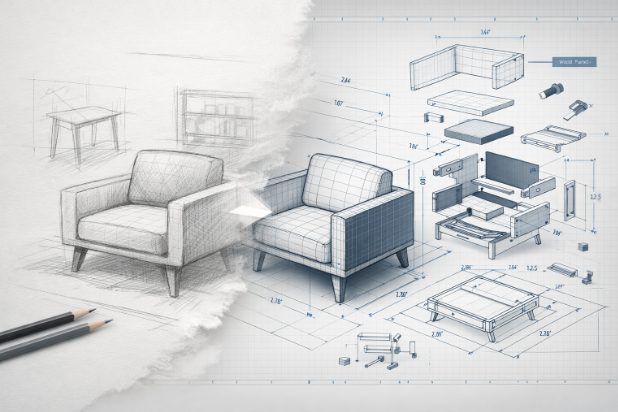
In furniture design, creativity is only the starting point. Sketches, mood boards, and 3D concepts may capture intent, but they are rarely sufficient to guide manufacturing teams toward accurate, repeatable production. The real challenge lies in translating design vision into precise instructions that manufacturers can interpret without ambiguity. This is where Furniture CAD Drawings play a critical role—bridging the gap between concept and construction with clarity, accuracy, and technical rigor.
As furniture projects grow more complex and production timelines tighter, build-ready documentation is no longer optional. It is the foundation that connects designers, engineers, fabricators, and production teams throughout the furniture manufacturing lifecycle.
Understanding the Creative-to-Production Gap
Furniture designers often think in terms of form, proportion, and experience. Manufacturers, on the other hand, must focus on materials, tolerances, machining processes, and assembly logic. Without detailed technical documentation, even the most elegant design can fail during production.
Common challenges include:
- Incomplete dimensions or unclear geometry
- Missing material or hardware specifications
- Ambiguous joinery and assembly instructions
- Inconsistent details across drawings
These gaps increase the risk of misinterpretation, leading to costly rework, wasted materials, delayed production schedules, and compromised product quality. Furniture CAD Drawings address these issues by converting design intent into a shared technical language understood across disciplines.
The Role of Furniture CAD Drawings in Furniture Manufacturing
Furniture CAD Drawings act as the blueprint for manufacturing. They translate aesthetic concepts into detailed, measurable, and manufacturable instructions that guide every stage of production—from prototyping to final assembly.
At a technical level, these drawings define:
- Exact dimensions and tolerances
- Material thicknesses and finishes
- Joinery methods and construction details
- Hardware placement and specifications
- Surface treatments and edge conditions
By standardizing this information, furniture manufacturing drawings ensure consistency across teams and production batches. Whether the piece is handcrafted or mass-produced, CAD documentation ensures the original design intent is preserved throughout manufacturing.
Key Components of Build-Ready Furniture CAD Documentation
Professional Furniture CAD Drawings are not a single file but a coordinated set of documents designed to eliminate guesswork. Together, they create a complete manufacturing reference.
1. Detailed 2D Drawings
2D drawings form the backbone of furniture shop drawings. These typically include:
- Plan, elevation, and sectional views
- Fully dimensioned components and assemblies
- Tolerance notes aligned with manufacturing capabilities
These drawings allow fabricators to visualize proportions and verify measurements before cutting or machining begins.
2. 3D CAD Models
3D furniture CAD design provides spatial clarity that flat drawings cannot. Models help teams:
- Understand complex geometries and intersections
- Validate ergonomics and proportions
- Identify clashes or design inconsistencies early
3D CAD models also support CNC machining and digital fabrication workflows, enabling direct translation from model to machine.
3. Exploded Views and Assembly Details
Exploded views show how individual components fit together. They clarify:
- Assembly sequence
- Fixing methods and fastener locations
- Sub-assemblies and modular components
This level of detail reduces assembly errors and speeds up production on the shop floor.
4. Material Specifications and Part Labeling
Build-ready Furniture CAD Drawings include clear annotations for:
- Material types and grades
- Surface finishes and coatings
- Edge banding, veneers, and laminates
- Part numbers and labeling systems
These details ensure that procurement, fabrication, and quality control teams work from the same specifications.
Benefits of Professional Furniture CAD Drawings
Investing in high-quality CAD documentation delivers measurable value across the entire furniture production process.
Reduced Errors and Rework
Clear, accurate furniture manufacturing drawings minimize interpretation errors. When details are defined upfront, manufacturers can execute designs correctly the first time.
Faster Prototyping and Production
Well-prepared Furniture CAD Drawings accelerate prototyping by allowing quick validation of design feasibility. Once approved, the same documentation supports efficient production without revisions.
Improved Cross-Team Communication
CAD documentation creates a common reference point for designers, engineers, suppliers, and fabricators. This alignment reduces back-and-forth clarifications and streamlines decision-making.
Scalability from Prototype to Mass Production
Furniture CAD design enables seamless scaling. The same drawing set used for a prototype can be refined and reused for batch or mass production, maintaining consistency across units and markets.
Use Cases Across the Furniture Industry
Furniture CAD Drawings are essential across a wide range of applications and market segments.
Custom Furniture
For bespoke furniture, CAD drawings capture unique dimensions, custom joinery, and material combinations—ensuring the final piece matches the original design intent exactly.
Modular Furniture Systems
Modular furniture relies on precision. CAD documentation defines standardized components, connection points, and tolerances that allow systems to scale and reconfigure without issues.
Hospitality and Commercial Furniture
Hotels, offices, and public spaces demand durability, compliance, and repeatability. Furniture shop drawings ensure products meet performance standards while maintaining design consistency across large installations.
Residential and Retail Fixtures
From kitchens and wardrobes to retail displays, Furniture CAD Drawings support tight space constraints, integrated hardware, and coordination with architectural elements.
Best Practices for Creating Effective Furniture CAD Drawings
Not all CAD documentation delivers the same value. The most effective Furniture CAD Drawings follow proven best practices.
- Prioritize accuracy and consistency across all drawings and views
- Align details with real-world manufacturing standards and machine capabilities
- Use clear annotations and standardized symbols
- Maintain version control to avoid outdated information reaching production
- Encourage collaboration between design, engineering, and manufacturing teams early in the process
By treating CAD documentation as a strategic asset rather than a final formality, teams can significantly improve production outcomes.
Conclusion
Furniture design succeeds when creativity and precision work together. While concepts spark innovation, it is Furniture CAD Drawings that transform ideas into tangible, manufacturable products. By translating creative vision into build-ready documentation, CAD drawings reduce risk, improve efficiency, and ensure design integrity from concept through production.
For furniture professionals operating in increasingly complex and competitive environments, robust CAD documentation is not just a technical requirement—it is a critical link between imagination and execution.


