



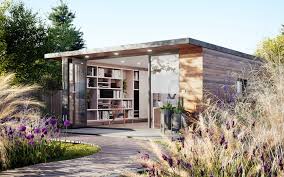
Creating a garden room home office requires careful planning to balance comfort, functionality, and style. The key lies in maximizing natural light while ensuring the space remains insulated and quiet. Choosing the right location and investing in proper ventilation and lighting are essential steps for a productive and enjoyable work environment.
Incorporating smart storage solutions helps keep the area clutter-free, making it easier to focus. Thoughtful decoration and ergonomic furniture also contribute to a workspace that supports long hours of work without fatigue.
A well-designed garden office not only enhances productivity but also offers a seamless connection with nature, which can improve well-being. Paying attention to these elements creates an efficient and inviting space that suits varied professional needs.
Consider Natural Lighting
Garden rooms can make the most wonderful home offices due to their positioning in the garden, surrounded by plants and natural lighting. It reduces eye strain and enhances mood, which can improve focus and work output.
Placing the desk near windows allows maximum daylight to illuminate the workspace. South-facing windows typically offer the most consistent light throughout the day.
Using glazed doors, skylights, or large windows can boost natural light without sacrificing privacy. Sheer curtains or blinds help control glare on screens.
Reflective surfaces like light-colored walls or glass tops can distribute light further. This minimizes dark corners and improves overall brightness.
Extra lighting options should supplement, not replace, natural light. Adjustable task lamps ensure proper illumination during cloudy days or late hours.
Create privacy
Privacy is essential for a garden room home office to maintain focus and reduce distractions. Using physical barriers like screens or room dividers can help separate the workspace from the rest of the garden.
Installing blinds or curtains on windows allows for control over visibility and natural light. Frosted or tinted glass can also provide privacy while still letting in daylight.
Plants are a natural way to increase privacy. Tall potted plants or a vertical garden wall can block views and create a quieter atmosphere.
Consider soundproofing options if noise is a concern. Adding insulation to walls or using weatherstripping around doors can cut down external sounds.
These elements work together to create a secluded and comfortable environment suitable for work.
Add personality
A garden room home office should reflect the occupant’s style while maintaining a functional workspace. Adding personal touches can improve comfort and motivation.
Incorporate artwork, photographs, or favorite colors to make the space visually appealing. These elements can create a welcoming atmosphere and reduce stress during work hours.
Plants are essential for introducing life and freshness. Choose a mix of low-maintenance options like succulents or ferns to add greenery without extra effort.
Furniture choices also influence personality. A unique desk or chair, perhaps vintage or custom-made, can make the office feel distinct.
Small details matter. Items such as personalized stationery, a stylish lamp, or decorative storage boxes offer practical use and enhance the room’s character.
Be strategic with power sockets
When planning a garden room home office, placing power sockets thoughtfully is essential. They should be positioned where devices will most likely be used, such as near the desk, printer, and charging stations.
Using multiple socket outlets can prevent clutter and reduce the need for extension leads, which can be hazardous. Consider installing USB sockets alongside traditional ones to support mobile devices directly.
It is important to plan for future needs. Adding extra sockets now saves the trouble of rewiring later if more equipment or lighting is added.
Power sockets should comply with safety standards, especially if the garden room is exposed to damp conditions. Installing weatherproof sockets or those with built-in residual current devices (RCDs) enhances safety.


