



Coming up with a music idea is often the easy part. The harder part is turning a mood, a lyric draft, or a rough concept into a finished track that actually feels usable. For creators working on videos, podcasts, ads, or personal releases, that gap between inspiration and output is usually where time disappears. That is why tools that make music creation feel faster and less technical are getting more attention from everyday creators as well as teams.
If you are looking for a text to music ai tool that is built around that exact need, ToMusic is positioned as a platform for turning prompts or lyrics into studio-quality songs, with both Simple and Custom creation modes, support for instrumental or vocal tracks, and a workflow that moves quickly from idea to downloadable music. The site also makes a strong case for practical use by pairing generation with exports, stems, vocal removal, and a cloud-based music library.
Why To Music Feels More Practical Than a Basic Music Generator
What makes ToMusic easier to recommend than a generic music generator is that it is not only selling speed. The homepage and music page both frame the platform around studio-quality output, text-to-song and lyrics-to-music creation, and a broader workflow that can support content creation, marketing, and commercial use. That makes it feel closer to a working tool than a one-click novelty product.
It supports both quick prompts and detailed control
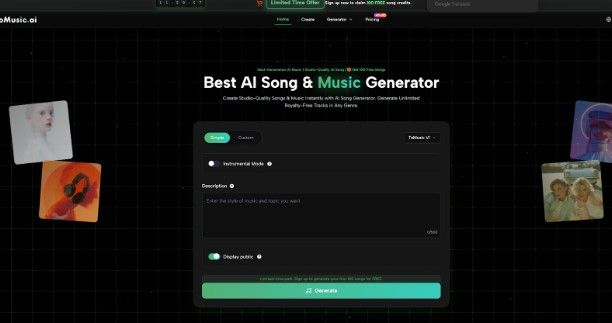
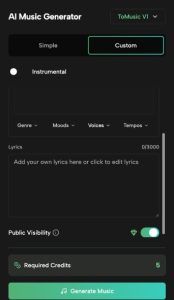
One of ToMusic’s strongest practical features is the difference between Simple Mode and Custom Mode. The music page explains that Simple Mode is built for descriptive prompts, where users describe style, mood, and characteristics, while Custom Mode gives more control over lyrics, style tags, instrumental or vocal settings, and precise musical parameters. That makes the platform easier to use for beginners while still giving more experienced creators room to shape the result in detail.
It is built for more than one type of music task
The platform also looks broader than a typical single-purpose generator. The main site and music page present ToMusic as useful for background scores, commercial jingles, full songs with lyrics, and specialized generators such as story songs, mood songs, vlog music, poems to music, and quotes to music. That range matters because it shows the platform is trying to support multiple creation scenarios instead of only one standard prompt-to-song flow.
The Best Features of This Text to Music AI
The most valuable features on ToMusic are the ones that make it feel usable after the first generation, not just during the prompt step. Based on the homepage, music page, pricing page, and assets page, the strongest points are custom lyrics support, multiple model options, WAV and MP3 download, stems and vocal removal, commercial licensing, and a music library that stores tracks and metadata.
Custom lyrics and longer-form control make it more flexible
ToMusic’s Custom Mode supports full lyrics, and the FAQ says users can structure them with tags like [Verse], [Chorus], [Bridge], [Intro], and [Outro]. The same FAQ also notes that different models support different lyric capacities, with V1 supporting up to 3000 characters and higher models handling extended lyrics. For users who want more than a short prompt-based result, that kind of structure makes the platform much more flexible.
The model lineup gives users more than one creative path
ToMusic’s FAQ highlights different model strengths instead of treating every generation the same way. It says V4 is strongest for vocal expression and creative control, V3 focuses on richer harmonies and rhythmic patterns, V2 is geared toward extended compositions with tonal depth, and V1 offers balanced performance with simpler controls. That is useful because users do not always want the same kind of output for every project.
Download, stems, and vocal tools add real production value
A big reason ToMusic feels more practical than a basic generator is that it does not stop at playback. The pricing page lists WAV download, MP3 download, Extract Stems, and Remove Vocal, while higher tiers add bonus credits for advanced tools and upcoming features such as music extension and music video creation. Those are the kinds of features that make AI music easier to move into real editing and publishing workflows.


How ToMusic Works in a Real Creative Workflow
ToMusic’s workflow is easy to understand because the interface is very direct. On the homepage, users can choose Simple or Custom, pick a model, choose Instrumental Mode if needed, enter a description, and generate. On the music page, the creation form expands into fields like Title, Styles, Genre, Moods, Voices, Tempos, and Lyrics, with a visible required credit count before generation.
It starts simply, but gives room to refine
That makes ToMusic well suited to the way many creators actually work. Someone can begin with a short idea in Simple Mode, then move to Custom Mode when they want tighter control over the style, structure, or lyrics. Because the interface supports both instrumental and vocal creation, it also works for users who need either background music or full song output from the same platform.
The library makes repeat creation easier
One of the quieter but more useful features is the Music Library. The assets page says every track is saved automatically with metadata including titles, tags, descriptions, lyrics, and generation parameters. It also says users can view the original prompt, settings, and timestamps for each track, which makes it easier to recreate successful outputs, maintain consistency, and keep projects organized across devices.

Who Gets the Most Value from ToMusic
ToMusic is easiest to recommend when you look at the use cases the site emphasizes. The music page directly highlights content creation and social media music, marketing and advertising music, and broader commercial production use, while the homepage also positions the platform for personalized audio, promotional content, and creative expression. That makes it a strong fit for creators who need original music regularly rather than occasionally.
Strong for creators and social content teams
For video creators, podcasters, and short-form content teams, ToMusic’s appeal is clear. The site says it can be used for TikTok, Instagram Reels, YouTube videos, podcast intros, and attention-grabbing background music. Since those workflows often need fast turnaround and repeatable output, the combination of prompt-based generation and music library storage is especially useful.
Useful for marketing and commercial music work
ToMusic also makes a strong commercial case. The music page says teams can use it for brand jingles, product theme songs, explainer video music, localized versions, and A/B testing variations, and the FAQ states that music created with the AI Music Generator comes with full commercial usage rights and royalty-free licensing. That makes the platform easier to justify for agencies and businesses, not just individual creators.
Final Thoughts
ToMusic works best when it is seen as more than a quick generator. Its strongest qualities are Simple and Custom creation modes, custom lyrics support, multiple model strengths, WAV and MP3 export, stems and vocal tools, and a cloud-based library that keeps each project organized. For creators who want faster music production without giving up too much control, that combination feels genuinely practical.
If you want a text to music ai platform that can move from a rough idea to a usable track with less friction, ToMusic makes a convincing case. It is especially appealing for creators, marketers, and teams who need original music often enough that speed, export options, and reuse start to matter as much as the generation itself.


